- New What’s new now lives inside the desk: open it from the settings menu to see each update, with a short clip of the change in the app where there is something to see. A small dot on the settings button tells you when something has shipped since you last looked.
- Improved Scrolling back on Market Internals now downloads less, and older history you have already loaded comes back from your browser after a reload instead of downloading again.
- Improved Your AI now grades a signal idea over history before it saves anything. The in-app chat and a connected AI (through the vyx connector) can test up to four versions side by side on the same 1,000 bars, see how much of the board each one lights and whether the markets it lights move more than the rest, and keep only the one that holds up. They also skip data fields Hyperliquid doesn’t publish, and describe a desk from its own explanation of what its colours mean.
- Improved A connected AI can now check a regime row for one cohort — memes, AI, a watchlist — or a row measured against crypto before saving it, and see exactly what it will read and across how many markets. Each regime row it reads now says what its high or low means (above zero, a share of its markets, or ahead of its baseline), so your AI stops calling a row high when it only means above zero.
- New Your resting limit orders are on the chart where they rest. Drag one to move it, or tap its ✕ to cancel it.
- Improved Every line you move now shows what the exchange did with it: hollow while it is on its way, solid once the exchange holds it, and back where it was, with the reason beside it, if it was refused.
- Improved The chart’s price handle says the one order it will place, like “+ Buy limit 83,469” or “Stop → 82,368”, and a single click places it. Stop here and Target here now move the stop or target you have instead of adding a second one.
- Improved Send now spells out the order, like “Buy limit 0.12 BTC @ 83,149”, and the size block is one field in the unit you think in, with the other three read back quietly underneath.
- Fixed A live stop or target move that Hyperliquid refuses no longer leaves its line at a price the exchange never took, and a lone target’s share on a live ticket reads 100% instead of a clipped 10.
- Improved The chart glides instead of stepping: the wheel zooms smoothly around the pointer, and ← / → pan the chart from the keyboard (Shift for a whole screen).
- Improved A stop, target or order you drag snaps to a nearby candle high or low, so it sits exactly under the swing; hold Alt to place it freely. Every chip reads back live as you drag, and a resting order or entry shows its distance from the market.
- Fixed A stop or target dragged through its entry, or an entry dragged into its stop or target, now stops on a price the exchange accepts, on its own side of the level. Before, it could stop on a fraction of a tick that read differently from what would rest.
- New Supertrend and Parabolic SAR join the chart indicators — Supertrend draws its stop solid under price in an uptrend and dashed over it in a downtrend, the SAR as dots — and both work in your own formulas as supertrend(10, 3) and sar(0.02, 0.02, 0.2).
- Improved Signals built from named parts score several times faster, so boards running the heavier indicators — Fisher Transform, CVD divergence, ADX — stay quick. The Fisher Transform now matches its textbook definition exactly.
- New Chart indicators: 150 studies — moving averages, Bollinger Bands, RSI, MACD, Ichimoku, pivots, CVD, funding and more — from the Indicators button on the chart. Search or browse, point at one to preview it on the chart, add it in a click, and press Board to scan every market with it.
- Improved Liquidity Sweeps, Order-Book Imbalance and Funding & OI Radar now light only when something happens. Liquidity Sweeps marks stop runs — price takes the 24-hour high or low and closes back inside. Order-Book Imbalance marks books held heavily bid or ask. Funding & OI Radar marks open interest jumping or flushing, with funding above the board. Top Gainers now marks breakouts — an hourly close beyond the last 24 hours’ high or low — and Cascade Radar lights only the bars where a forced-flow burst hits the tape.
- Fixed Proof now grades signals built on the BTC-relative fields (a market’s own move after taking out BTC’s). Before, it replayed them as flat and reported that they never fired.
- Improved Whale Flow now shows where whales keep hitting one side. A market lights green while its biggest orders keep buying and red while they keep selling, and the rest of the board stays dark, so you see runs of whale activity instead of noise. A strip above the board reads whale buying against selling across crypto.
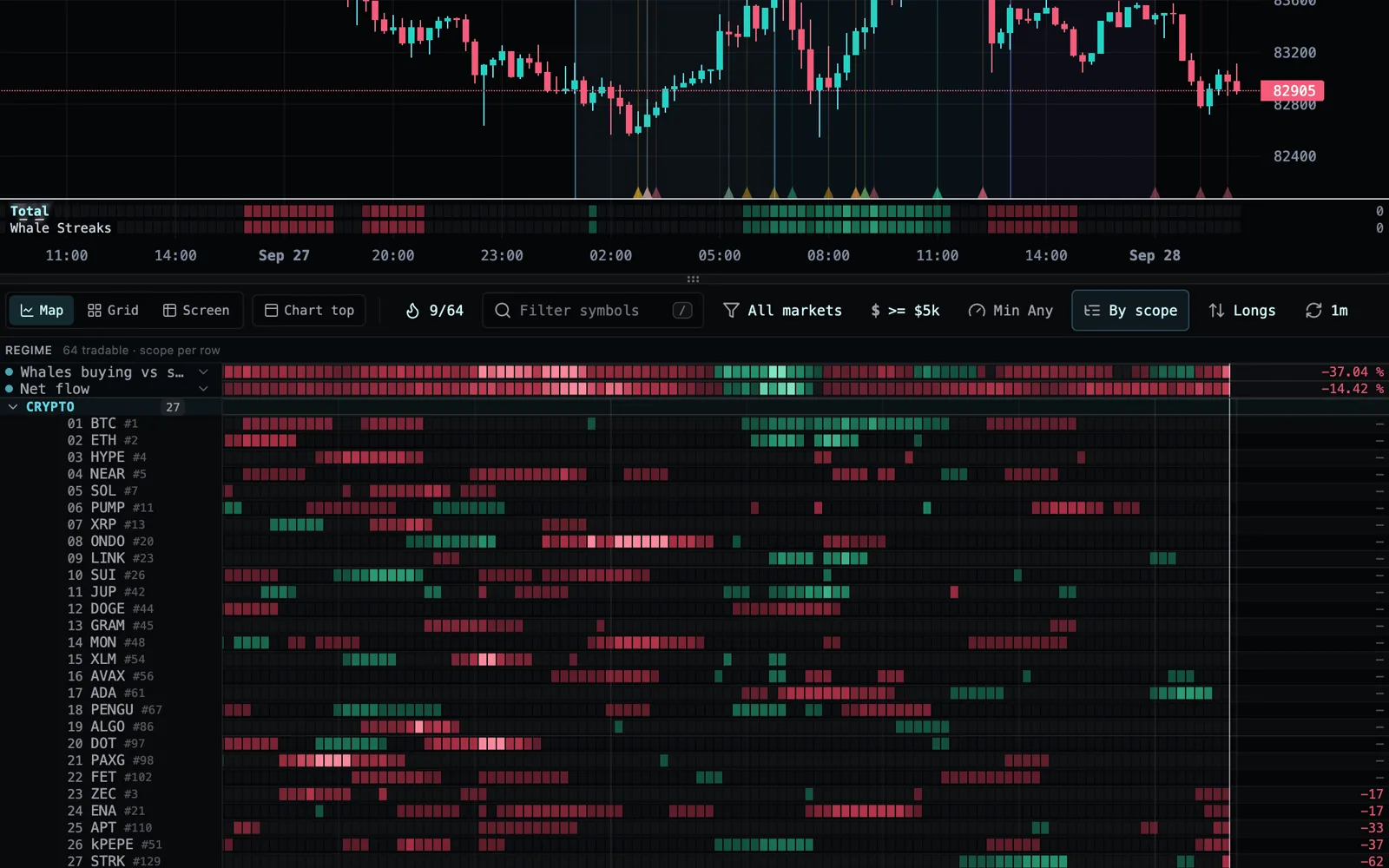
- Fixed Limit and stop-entry orders sized in R now risk exactly what the ticket says. Size is measured from the order’s own entry price instead of the market price, so a stop entry above the market can no longer come out many times larger than 1R, and a limit below it no longer comes out smaller.
- Fixed Opening the Screen view on a desk grouped by theme, like Market Sentiment, no longer freezes the board. A market listed under two themes now shows once in the screen.
- Fixed A desk whose signals, regimes or pins were saved twice (for example by an AI assistant editing it) now loads cleanly instead of freezing, and the analyst read shows each setup family once.
- Fixed Moving from one guide, doc, blog post or market page to another now updates the page title and the “Open VYX” button, so it opens the desk for the page you are reading instead of the first one you visited.
- Fixed On a slow mobile connection, the Map’s older history now loads one stretch at a time, so the stretch next to what you see arrives first instead of timing out while it shared the line with the ones behind it.
- Fixed The Market Internals desk now opens with a fraction of the data it used to download, so its board appears quickly, and within about a minute even on a slow mobile connection, where it could fail to load at all. Large loads on a slow connection are no longer cut off while they are still arriving.
- Fixed A double-press of Send, or a quick second Enter, can no longer place the same order twice. Send now reads Sending… until the order lands, and the ticket clears for your next order once it does.
- Fixed Clicking an order’s label on the chart no longer nudges the order. A line only moves when you actually drag it, Esc puts it back mid-drag, and prices you place from the chart land on prices the exchange accepts.
- Improved A live limit order with a stop or target staged now tells you, before and after you send, that the stop and target go on separately once it fills, so a filled limit never looks protected when it is not.
- Fixed Trading hotkeys now only work while the order ticket is on screen, and flipping side with B or S carries your default stop to the right side of the entry.
- Improved Dragging, zooming and hovering the chart is far smoother, especially on slower laptops: the Map below slides along with the chart instead of redrawing every frame, a flicked chart glides to a stop, order lines stay locked to the candles as the price scale moves, and live prices update without hitching the desk.
- Improved New accounts now open on Market Internals — how many coins are being net-bought, whether a move is new longs or shorts covering, and whether cascades and thin books make it fragile — with Market Sentiment’s price read one click away beside it. Eight desks are ready on your first visit instead of seven.
- Fixed The Trade Desks & Signals and Reference Docs windows now show a single close button instead of two stacked X’s.
- Improved Editing a built-in desk no longer leaves a trail of “copy” desks behind — the desk becomes yours right where it sits, keeps its name, and every change lands on it. Undo or Reset brings the original back.
- Improved Scrolling back through older bars now downloads about a quarter of the data it used to, so earlier history loads faster, especially on a slow connection.
- Fixed The AI chat no longer goes blank with “No response — try rephrasing.” after reading a chart. Ask for more data than fits in one reply and it hands you the slice that matters and says where the rest lives. A reply that runs long now says it was cut off instead of stopping mid-table.
- Fixed Ask the AI chat how to take your charts or data into Claude, ChatGPT or another AI and it now points you to the VYX connector — one URL, free on every plan — instead of saying there is no way to connect.
- Fixed New accounts now get the short tour of their first desk, and signing up on an iPhone no longer zooms the page when you tap the email field.
- Fixed Signing up no longer starts over if you switch to your inbox for the emailed code — the page stays put until you come back.
- Fixed Older history on the board loads more reliably: it fetches only the markets your desk shows, keeps whatever arrives even if part of the network is slow, and retries quietly in the background instead of showing “History load failed”.
- Improved Your first minute on VYX now starts somewhere: the one question we ask when you sign up sets up your desk for your answer and opens the AI chat with a few questions to start from. Came from ChatGPT or another AI? You can connect it from the chat once you are on the desk.
- Fixed The connection light starts neutral while the desk connects instead of flashing red, and a few upgrade screens now name the right plan.
- Improved Signing up on a phone is now smooth: the sign-up screen opens faster and typing your email no longer stutters. On a computer, verifying your email opens the desk you were looking at straight away, instead of reloading the page and starting it again.
- Fixed Scrolling up and down the Map no longer greys out the rows and repaints them. While live prices stream in, every row keeps its colours as you scroll, and the scores refresh in place.
- Fixed When an AI you connect updates one of your regime rows, the row now stays under the board section you placed it in instead of jumping back up to the band. Your AI can also now see every regime row on a desk, so it changes the one you mean on the first try, and it can place a row under its group’s divider on the board, just as you can from the row editor.
- Fixed A regime row you place under a group now lives only under that group — it no longer also shows in the regime band at the top when the board is grouped another way.
- Fixed The AI chat now opens on its latest message, on desktop and phone, and stays there as charts load in, so you never have to scroll down to see the newest reply.
- Fixed Folding a section on a grouped board no longer switches the chart to whichever market slid under your cursor. The chart follows a row only when you actually point at it.
- Fixed The regime rows at the top of the Map no longer go blank after you switch between Map, Grid and Screen.
- Improved On a slow connection the Map now loads first. Older history waits until the Map has landed instead of competing with it, and a first load the connection drops is tried again rather than swapped for a much bigger download.
- Improved Desks that read only price and volume, like Market Sentiment, now download about five times less when they open, so the Map appears in seconds even on a slow mobile connection. Add a signal that needs more and the desk fetches the rest on its own.
- New New built-in desk: Market Internals. Market Sentiment tells you what price did; Market Internals tells you whether to believe it — how many coins are being net-bought and how hard, whether the coins that are rising are rising on new longs or on shorts covering, whether cascades are running hot and whether the books are thinner than usual. Every crypto cohort gets its own row showing how hard it is being bought against the rest of crypto. Add it from + → Start from a template.
- Improved Market Internals now reads the large traders too. A fifth score, Participation, shows how much of each market’s volume its recurring large traders are carrying, how many wallets are trading aggressively and whether one wallet is carrying the move — each against that market’s normal — and a new Whales row on the band tracks it across crypto.
- Fixed Breadth rows on the regime band no longer paint the first bars of a long lookback as “none of the market”. Until there is enough history to measure, those bars now stay blank instead of reading as a solid risk-off stretch.
- Improved Market Sentiment now reads crypto. Its four field rows read crypto markets, and every cohort row — Majors, L1s, Memes and the rest — is measured against crypto instead of the whole venue, which during US hours is more than half tokenized stocks. The rotation read no longer flips on what the stock market is doing, and no longer lurches every evening when the stocks go quiet after the US close.
- New A relative regime row can now choose what it is measured against: the whole field, or one asset class — crypto, equities, commodities, indices or FX. Pick it in the row editor under “vs the field”; your desk’s analyst, the AI chat and any AI you connect read the row against the same baseline you chose.
- Improved A regime row with nothing to measure now says so. When none of a row’s markets are tradable on your board — L2s after the US close, say — it keeps its place, dims, and reads “0 mkts” instead of showing a blank strip that looked like it had failed to load. It lights back up on its own the moment a market qualifies again, on the desktop and on your phone — and your desk’s analyst, the AI chat and any AI you connect read the same “0 mkts”, so none of them mistakes an empty cohort for a broken read.
- Fixed Cascade intensity, session CVD, venue premium, impact prices, the open-interest range and buy/sell print counts now read their real values on the board, in your analyst’s read and through the AI connector. They had been reading zero on every market, which left the Cascade Radar desk’s cascade reading dark.
- Fixed Book-depth metrics (resting depth, per-level size, L1 order counts) now reach your analyst and connected AI the same way they reach your board, and a regime preview no longer calls a metric clean when no market produced a value.
- Improved A cohort row that is really one market now says so. When only one of a row’s markets has a reading — so its “median across the cohort” is just that ticker’s move — the row keeps its number and wears a quiet “1 mkt” beside its name, on the desktop and your phone, and your analyst, the AI chat and a connected AI are told the same. One name ripping no longer reads as its whole sector being bid.
Sep 22, 2026
The trade desk is open on every plan- New Screens: set a signal to match All and the new Screen face lists every market meeting your conditions right now, the ones that just left, how long each has held and the move since — with a match-history strip per row, columns you choose (any formula), and an alert when a market enters.
- New The Screen keeps a History: a 14-day server-recorded log of every market that entered and left it, with when, the price, how long it held and the move since — and it is now on your phone as a tab too.
- New Formulas can read another timeframe: tf(rsi(close, 14), 240) is the 4-hour RSI on any board, read from closed candles so it never repaints — screen a 15-minute board with a daily or 4-hour condition.
- Improved Formulas now nest and name their parts — lowest(rsi(close, 14), 20), r = rsi(close, 14); r < 30 — and gain event functions (swing highs and lows, crossovers, "bars since", "value when"), so divergences and swing structure are something you write, not something you wait for us to build.
- New The trade panel is back for everyone, Free included. Your practice book, open positions, resting orders and the order ticket all sit beside the board again, running against the $10,000 simulator that follows your account across devices — so you can work the whole loop on a live market before anything is at stake. Going live with real money on Hyperliquid is still part of the Trader plan and up.
- Improved The trade column folds. Tuck it away with the control in its top corner and it becomes a slim Trade tab you can open again any time; the width you set is waiting when you come back. Move the chart into the column and it opens and widens itself to fit — and if you fold it while the chart is in there, the chart returns above the board rather than disappearing with it.
- New Your own AI can trade your practice book on any plan, Free included. Connect the vyx MCP server to Claude, ChatGPT, Cursor or any client that speaks it and the two of you can work a real setup end to end on play money — it reads the live board, you agree on the trade, it places it and manages the stop from the conversation. It was refusing every order on Free, practice books and all; now only the live wallet asks for a trading plan.
- Fixed On a Free account the practice ticket now actually places orders. It was drawing the market a blank: no price, no stop, no size, and a Send that stayed greyed out reading "no market data". The ticket arrives with the focused market and a protective stop already on the chart, so your size in R resolves the moment it opens and one press sends. The rest of the practice desk came back with it — the Trade tab on your phone, order lines you can drag on the chart, your fills marked on it, Trades & PnL, and the Practice and Order ticket settings.
- New A regime row can now live on the board instead of above it. Pick a sector, theme, asset class or watchlist under Place in the row editor and the row drops in directly beneath that group’s divider, reading that group and nothing else — so a cohort carries its own read right where its markets are, and the band above stays for the market-wide rows.
- Improved Market Sentiment now reads the rotation in place. Its band is the whole field — how much of it is above its own trend, what the middle market did, where it sits in its range, how much of it is beating BTC — and each cohort’s move against that field sits down on the board under its own divider: Majors, L1, L2, DeFi, Meme, Crypto infra, Payments, Semis, Macro, Commodities, AI and Crypto-linked. The strip tells you the market is bid; the section under it tells you who is bidding.
- Improved Grouping the board is quieter and says more. Sections are now the cohorts you actually rotate between, so the long tail nests instead of fragmenting — a GPU cloud, an optical-interconnect maker and a power producer read as one AI build-out cohort rather than three one-name sections. Two new cross-cuts join AI and Crypto-linked: Solana (the chain, its DEXes and its memes in one read) and Perp DEX (the venues you are trading on). Nothing was dropped — every market still lands in a section you would name out loud, and a cohort read never appears over a section holding a single market.
- New Choose which sections the board groups into. The grouping control now lists every section your board would draw — each with how many markets it holds right now — so you pick the handful of cohorts you actually trade, and your watchlists are a choice too rather than all of them at once. Nothing leaves the board: whatever you did not pick drops into an “Other” section at the bottom, which you can switch off for a strict view of just your cohorts. The choice is saved with the desk.
- New The trade column has two tabs, right under the chart: Trade and Info. Trade — where every session opens — is your account and the order ticket, with nothing stacked above them any more. Info is the market: its latest catalyst and what is scheduled next, volume, open interest, funding, how much the book can take, what is moving with it, and its tags — press a tag and the board shows you that whole group. A dot on Info tells you a headline landed today without leaving the ticket.
- Improved The ticket now says what an order costs to fill. Under Send, a market order shows its expected cost from mid — half the spread plus the depth your size eats — on the size that will actually go out, so the last thing you read before sending is what the fill will cost you.
- Improved The market is named once. The chart used to print the ticker twice — in its header and again over the candles, with the instrument’s description spilling across the top. With the trade column open, the column names it and the chart is all chart; fold the column and the chart’s own line comes back.
- Improved On a phone, trading has one home. The order ticket no longer wedges itself between the chart and the heatmap on the scan faces — Map, Grid and Table give the chart and the board their full height again, and the Trade tab is the trading surface: chart on top, your positions below it, and the ticket docked under your thumb. Stage an order from a chart long-press anywhere and you land there ready to send.
- Improved Every market on the board now sits with its peers. We tagged the 53 markets that were still in Unlabeled — the AI build-out names (memory, optics, power, GPU clouds), the rates and volatility feeds, the private AI labs — and added Neocloud, Networking, Power, Robotics and Quantum as groups you can scope, group and build a regime on. From now on new Hyperliquid listings are researched and tagged within the hour of appearing, so grouping the board keeps working as the venue grows.
- Fixed AI chat works again on the Free plan. For a few days it answered every message with an error instead of a reply — Composer AI chat is free, unlimited, and needs no card, exactly as our pricing says, and it is back to that for everyone.
- Improved When a chat message genuinely cannot be sent, the chat now says so in plain words instead of showing a technical error code.
Sep 20, 2026
Give the board the whole screen- New Every row that paints cells can now carry its own colors — each metric row under the chart, each regime row, and each group of the board. Click a row’s name (or the swatch on a group’s header) and pick Flow, a red-green color-blind pair, Ice, Violet, or your own two. Stacked rows measuring different things stop looking like one instrument, and a board grouped by scope tells crypto from equities before you read a label. Colors belong to the Trade Desk, so each desk keeps the way you set it up. The picker tells you if a pair is hard to tell apart, merges under color blindness, or sits too close to the colors your own fills use — and your fills, stops and targets always keep their own colors, so a trade never disappears into the market.
- Improved Patterns now come with the paid plans, alongside trading. Capturing a window on the chart, reading its evidence and painting it across the desk are part of Trader and up; free accounts keep the full scanner, unlimited signals and the AI builder. Accounts from the beta already have it.
- New The chart can now sit in the trade column instead of above the board. Two icons beside the Map/Grid/Table toggle move it: docked, it goes above your trade panel and hands its half of the screen back to the board, which runs floor to ceiling and shows roughly three times as many markets at once — with the ticket still right underneath. It is the same chart on the same timeline either way, so panning or zooming either surface moves both, and a cell still means the moment it always did. Drag the divider under the docked chart to size it; your desk remembers where you left it.
- Fixed Asking your connected AI what desks you have now comes back as a clean index — each desk’s name, how many signals are lit, how many regime rows it carries and when it last changed. It used to hand back every desk in full, which could fill your assistant’s working memory before it read a single name. The whole desk is still one request away.
- Improved The vyx connector now speaks the newer releases of the assistant-connection standard, and an AI app that asks for one we don’t serve is told exactly how to connect instead of being left to guess — so newer clients attach on the first try.
- New Every market’s score now reads as a number down the right-hand edge of the board, lined up under the chart’s own numbers — so one strip tells you where the whole desk stands without opening anything.
- Improved Each regime row’s reading moved from its name to that same right-hand column, in line with the chart above it. The band now reads left to right — name, painted history, where it stands now — and the names have the room to be read in full.
- Improved Put the crosshair on any bar, on the board, the regime band or the chart, and the whole column jumps to that moment — so you can scrub back through a move and read the scores that went with it.
Sep 19, 2026
Desk switches that land at once; analyst cards that have to pay- Improved The board’s controls moved off the right-hand column and onto their own row across the top of the board, directly above the regime strip. The view switcher, the firing count, the ticker search and every filter now read left to right over the board they shape, and the board itself has the full width back.
- New The Setups tab now opens with the analyst’s read of your desk: each setup family marked hunt, selective or stand from its last pass, with how long ago it looked. Click the line for the environment, what decides each family, what would flip the read and what moved since — so an empty feed tells you why the analyst is standing aside.
- Improved Switching between trade desks is now close to instant: a desk you have opened before, or one sharing signals with your current desk, paints from memory instead of re-scoring the board, and desks you have not opened yet are scored quietly in the background while you work.
- Improved Switching to a desk on another timeframe no longer freezes the board for seconds: the new timeframe’s history arrives in one step, the size filter is already in place, and cells still being scored show a calm placeholder for a moment instead of blocking the page.
- Improved The Analyst view now says whether your desk has an analyst and whether it is hunting, with Start, Stop and the run interval right there. One AI button is always present: draft instructions from your desk, improve the draft in the box, or revise a running analyst — every suggestion opens in the form, labelled as drafted by AI, for you to apply. Create analyst makes it and starts it in one step, and an analyst can now be removed from the view. Setups filed by your own connected AI over the MCP now show on the Setups tab even when the desk has no analyst, and the empty tab points to both ways in.
- Fixed Switching from a desk on one timeframe to a desk on another could briefly show bars from the previous timeframe mixed into the new board. Each desk now shows only its own timeframe.
- Improved Analyst setup cards now need room to pay: the second target sits at least twice the risk from the entry, or the card is not filed. The same floor applies to cards your connected AI files, and its reply says so.
- Fixed A card whose entry was resting at or under the market and gapped through it now grades as the trade it was — filled at the open, then stopped or paid — instead of being voided as “the entry never printed”. The record no longer hides those losses.
- Fixed The analyst’s read now lands when it names a regime row by its own label — “Memes −2.9%” for a row called “Memes · 24-bar move” — instead of being dropped for not spelling the whole name; a label two rows share still names neither. Cards that depended on those reads were being lost with them.
- Fixed When the analyst writes that one of a card’s own end-conditions has tripped, the card is now withdrawn on that condition instead of held — and price conditions written as “a close back below the 29413 support” are tested by the desk on every bar like any other. A condition naming one regime row and a threshold (“Sweep Direction under −30000”) is now tested by the desk too.
- Fixed The settings button on a signal in your desk panel now opens that signal’s menu, so you can tune the weight of any signal on the list and open any of them in the editor — not just the one already being edited.
- Fixed Signing in to a different account, or letting a new version take effect, could stop on a browser dialog asking whether to leave the site. It no longer appears — most visibly on a fresh signup, where the first sync now finishes on its own.
- Fixed Switching trade desks while the analyst’s run controls were on screen could stop the board redrawing part-way through the switch, leaving stale panels until a reload. Desks now change over cleanly every time.
- New Your AI can now put a SIGNAL on the Workbench, not just a chart: one signal’s score bar by bar for a market, scored by the same engine that ranks your board. It can plot a signal already on your desk, or compose one for the question and score it WITHOUT saving it — so you can see whether an idea would actually have fired before it goes anywhere near your signal rail. A drafted one is marked DRAFT and carries Keep as signal; only you decide whether it lands on the desk, and the study then records which signal it became.
- Fixed A signal study now shows a gap, not a zero, on bars it could not score — a condition unmet, a hole, or too little history behind the bar for the signal’s own lookback — with the warm-up shaded at the left. A flat line no longer means “nothing happened” when the truth is “this could not be worked out yet”.
- Fixed Indicators composed by AI that measure a distance from a reference — price against its own 200-bar mean, say — now keep the setting that preserves which side of the reference they sit on. They were being re-centred on the field’s middle, which could paint the wrong side.
- Fixed The sign-in form now tells your password manager that it is a sign-in, not a new account — so on a phone it offers your saved VYX password instead of pushing you to generate a new one.
- Fixed A brief connection hiccup as the app started could leave your trade-history sync retrying in a tight loop instead of settling. It now waits and retries quietly, and no longer shows a sync error while you are still being signed in.
- Improved The analyst’s running narration keeps the names that matter: a name that has left the board is no longer carried along, and on a crowded board the names with live cards and the ones forming a plan keep their place ahead of the ones the read has ruled out.
- Improved Session shading now draws on 1m through 30m only. On 1h a session was a handful of candles wide, so the bands traced the bar grid rather than a real open — the same reason they were already off on 4h and 1d.
- Fixed After a timeframe switch the board could sit on a short first window with the “Loading history” note gone and the older bars still to come. The note now stays up from the switch until the history is actually on the board, a switch made while an earlier page was still arriving no longer loses its follow-up load, and a board left short with nothing on the way now asks for its history again on its own.
- Improved Older history after a timeframe switch now arrives in two steps instead of one long wait: the first stretch of bars lands as soon as it is in, and the deeper stretch follows. The desk’s quiet background catch-up also steps out of the way while history is loading, and polls less often when nothing has changed, so it no longer competes with the bars you are waiting on.
- Fixed The research column now opens on Setups for accounts with analyst access. Chat-created studies still open Workbench when they arrive.
- Improved Set your analyst’s run interval directly from Setups. New analysts follow the desk interval by default; choose a fixed interval from 1m to 1d or return to following the desk anytime.
- Fixed AI chat lets you scroll gently into earlier messages without snapping back to the bottom, including while a reply is arriving.
- New Click a regime’s group name to see its tickers on the desk. A temporary group filter works across Map, Grid and Table; × or Esc restores your previous view and place.
- Improved Your desk’s signals now live in a Signals tab in the left panel, beside Setups, Workbench and Analyst, with the desk name above them. The hover gear on the desk tabs is gone, switching tabs no longer resizes the board, and you can drag the panel’s edge to give the signal editor more room.
Sep 17, 2026
Research beside your conversation- Fixed Each desk now keeps its own regime strip: adding, editing or removing a row stays on that desk across devices, and older desks retain their existing rows.
- New AI chat can create saved charts, comparisons and flow studies in your desk’s Workbench, with links to reopen them and a mobile Chat/Workbench switch.
- Improved Chat suggestions for your analyst open in its editable instructions form, preserving your draft and requiring review when saved instructions have changed.
- Improved Analyst setup cards now say why the entry and the invalidation sit where they do and list the conditions that would end the call, with each target’s reward-to-risk and the risk as a share of entry computed for you from the frame.
- New The analyst keeps a running narration of every name on its board each pass — what it is doing against its levels, which gates are open, what would make it a setup — and follows its own cards from filing to resolution. Every number in it is one your desk shows. Available today to your connected AI over the API/MCP.
- New The analyst now manages its own live setup cards each pass — holding, withdrawing when a condition the card stated has tripped, or tightening the frame (never widening the risk) — with every decision logged on the card.
- Improved Setup cards now show why the entry and the invalidation sit where they do, the conditions that would end the call (a tripped one reads in red), and — on a live card — the analyst’s latest line on that name with its state.
- New A new starter board: Market Sentiment. It answers the question you ask before any other — is the market risk-on or risk-off right now, and which corner of it is leading — and it answers it from price alone: where each market sits against its own 50- and 200-bar means, how hard it has moved, how much of that move is its own rather than BTC's, and whether its range is widening. Above the board sits a read of the whole field, and then each cohort — majors, L1s, L2s, DeFi, memes, AI, semis, crypto-linked equities — as its move MINUS the field's, so a row above zero is a cohort being bid rather than one carried along. The board is grouped by those same cohorts, and every read is counted in bars — so the timeframe control moves the whole desk, from a session read on 5-minute bars to a multi-day one on 1-hour. New accounts now open on it, with the order-flow boards one click away in the rail.
- Fixed A regime row scoped to a sector or theme now says so. Its dot read "All tradable markets" however it was scoped, and picking Group in the row editor silently dropped the scope because there was no group to pick — the editor now offers the full list of sectors and themes, and the row names the one it reads.
Sep 16, 2026
Free is the research desk- Fixed Mobile view tabs stay visible and tappable when the chart is enlarged or the desk has many regime rows, restoring access to AI chat, Trader and the other views.
- New Two new ways to compose a regime row. Dispersion reduces a metric to how far apart the markets read — the standard deviation across the field, the instrument a mean-reversion desk needs. And a scoped row can now read "vs the field": its cohort minus the whole board in one signed number, so "memes against the market" is a single row instead of two you subtract in your head. Both paint on the band, read in the strip, and reach your AI the same way.
- New The Desk Analyst can now have its flow faculty switched off for a desk that reads price alone: no tape, no absorption lines, no volume terms in its context — it times off price structure instead of being told to ignore evidence in front of it.
- New Your desk's regimes are its read. The Desk Analyst now reads your desk's regime strip before it hunts, every pass — and reads nothing else. Its read names the environment, says for each of your setup families whether it is hunting, selective or standing aside, where the read holds, and the one regime reading that would flip it. Every line cites one of your desk's own tiles by name; a line that cites none is dropped before you see it. A setup card must descend from that read — a family marked stand-aside is never carded, and no read means no card. Your AI over the MCP reads the same read and composes regimes with the same intention: a new tile joins the desk's strip as it is created, and an analyst is not stood up on a desk with nothing to read.
- Improved The Free plan is now the research desk, end to end: the live order-flow board across every Hyperliquid market, unlimited signals, the AI builder, regimes, watchlists, shareable trade desks and read API access — with the trading half of the app put away. New free accounts no longer see the order ticket, positions and orders, the practice book, wallets or Trades & PnL, so the desk opens on the work of reading the market instead of a trading surface you have not asked for yet. Trading starts on Trader ($29): the chart becomes the order ticket, with the practice book and non-custodial live trading behind it.
- Improved Fund — the dashboard for your connected paper research workers — moves with it, and is now part of Trader and up.
- Improved Your existing account is untouched. Every account created before the plans launched sits on Autopilot at no charge, and every paid plan trades exactly as it did — this changes what a brand-new free signup sees, nothing else.
- Fixed A regime tile scoped to one sector, theme or set of asset classes was reducing over the whole market anywhere your AI read it — over the MCP, in the in-app chat, and through the API. So a tile you set to memes printed the same number as the field, and nothing said why. Scoped tiles now read their own cohort everywhere, so "memes down 3% against a field that is flat" is a rotation your AI can actually see. A tile scoped to a watchlist reads that watchlist in the chat for the first time.
- New An AI working your account over the MCP can now build a scoped regime tile itself, not just a market-wide one — one sector or theme, a set of asset classes, or one of your watchlists. Ask it for a cohort strip and it can stand the whole thing up: majors against L1s against memes against semis, each reduced over its own markets.
- New Your AI can now set a desk's interval over the MCP. A desk it composes no longer lands on the 5-minute default with no way to move it — it can stand up a slow, hourly desk end to end, and the analyst and trader on that desk read the bar it chose.
Sep 15, 2026
Honest chart structure on quiet markets- Fixed Chart structure now reads true on thin markets. On symbols with stretches where nothing trades — off-hours equity and index markets especially — a quiet bar could be read as a price of zero, so a name's support sat at 0, its range ran from 0, and its volatility read as an impossible number. Those bars are now skipped, and a symbol with too little real trading makes no structural claim at all. Your desk analyst, your AI trader and anything reading the board over the MCP see the levels that actually traded.
- Fixed cascadeScore used to go blank for ten bars every time our collector restarted — ten hours of 1h bars, forty hours of 4h, and the daily bar never scored at all. The collector now warms its baseline from stored history on start, and every blank bar in the last month has been re-scored from the tape it recorded.
- Fixed uniqueTakers, topTakerShare and repeatWhaleNotional were missing on the busiest BTC and ETH 4h and daily bars. The per-bar cap that hid them is sixteen times higher; bars from today onward carry them.
Sep 13, 2026
Your research team, in one view- New The private Fund dashboard shows your connected paper traders, positions, five-minute decisions, research comparisons and fixed instructions, with clear status when a worker or its data is unavailable.
- Fixed New app pages load without repeatedly reopening an older cached version.
Sep 12, 2026
Your AI sees the candle that is forming- New Candle history over the MCP and API now includes the bar that is forming right now, updated every second from our own feed. Ask for a 4h read and you get the live 4h bar with its open, high, low and close so far, not a bar that closed hours ago. Your AI is finally reading the same right edge you are.
- Fixed On 15m and higher timeframes the forming bar used to arrive with no price at all. It now carries the live price alongside the order book fields.
Sep 11, 2026
Every market your AI can name, it can read- New When your AI reports a bug or sends us feedback, it can now read our answer back. We act on reports the same day and write a reply to the AI that filed it — fixed, answered, queued, declined, or waiting on more detail — and it sees where each of your reports stands the next time you work together, so it stops rebuilding a workaround for something we already fixed. It only ever sees reports filed from your own account.
- Fixed Your AI no longer reads a higher timeframe bar close as the live price. Candle history is closed bars only, so on a 4h read the newest close can be hours old; it used to be labelled simply "now". Every read coarser than 1m now says how long ago its last bar closed and quotes the current price beside it.
- Fixed Your AI can now read any Hyperliquid market over the MCP, not only the ones currently on your desk's board. Asking about a market your desk filters out — or one that was on the board a minute ago and isn't now — used to come back "couldn't resolve"; it now returns the market's real structure, tape and microstructure, and says plainly that it carries no desk score and why.
- Improved The board your AI reads now names itself: how many markets are on it, at which interval, and that it is your desk's universe rather than the whole venue — so your AI stops concluding a market doesn't exist when your desk simply isn't showing it.
- Fixed A bar whose open interest had not been measured yet no longer reads as a total open-interest wipe. Freshly opened candles were briefly reporting an impossible -100% OI flush, which could make a quiet market look like a violent deleveraging.
Sep 9, 2026
Your AI reads the whole move- Improved AI chat now defaults to GLM-5.3 Flash. If you have access to the model picker, your saved choice is preserved.
- Fixed Heatmap columns line up with their chart candles again after the Alerts/Pinned panel removal, including while zooming.
- Improved When your AI pulls candle history over the MCP it now gets a summary of the whole window first: what price did across the entire slice, and what order-flow imbalance, cumulative volume delta and open interest did through each third of it. A rally that ran the whole way on negative book pressure now reads at a glance instead of bar by bar.
- Improved Your AI can tell when it is only holding part of a move. Candle history now says whether older bars exist and hands back the exact point to continue from, so asking about "the premarket" or "this whole rally" gets the window paged back to where the move actually began rather than the last few bars.
- New A new guided request for connected AIs: ask it to analyze a move end to end and it finds where the move started, reads what flow did through each stage of it, checks the frame around it and the catalyst behind it, and only then looks at what is happening right now.
- Improved Switching markets now clears the unfinished order ticket. Parked setup chips are removed, and returning to a market starts a fresh ticket.
- New Hear when the Analyst posts a new setup: enable the speaker beside Start/Stop to preview the alert chime. Your browser remembers the choice, and existing cards and outcome updates stay quiet.
- Improved The Alerts/Pinned panel beside the chart is removed, giving the chart more room. Price alerts stay on the chart, starred markets stay on the board, and notification controls are available in Settings.
- Improved The desktop trade panel is more compact: wallet, balances and history share one summary, the ticket is immediately available, and duplicate Trade and ticker headings are gone. Connection details now call the trading credential a trading key.
- New Your AI can now trade with you. The AI you talk to over the MCP places and manages the positions the two of you agree on — open with a stop and a target, tighten or move protection, take partials, close, cancel or move a resting entry — in your practice books with no setup at all, and on the Hyperliquid agent wallet you approved once the live switch is on: a single switch on your account, off by default, that your AI flips when you tell it to trade live. Every live order passes your money guardrails against the venue's own account state, stops move cancel-first so the venue never holds two, the kill switch stops everything, a wallet a desk trader is running on is left to the trader, and the key it trades with can never withdraw.
- New Your AI has the desk analyst whole over the MCP: it can stand one up, write its standing orders, choose what it perceives and how often it looks, switch it on or off, and remove it — the analyst is the mind you co-work with, so it is yours to shape from the conversation.
- New Your AI can now read a desk the way the desk's own analyst does. Ask for the analyst view of the board and it gets the whole context the analyst hunts from — the session clock, the field, each regime as its recent series, every row with its percentile against its own history, price against range, higher-timeframe trends, fillability and chart structure, the tape, live setups and the record. Regimes can be read as their series too, and one market now reads top-down: structure and the tape first, the current bar last.
- New A desk now carries its mandate for the AI you connect: its description and explainer, the analyst's standing orders, and what already stands on it come back together, and your AI can write those standing orders — the same brief the desk's analyst obeys — so a new session starts from what the desk is for instead of guessing it from signal names.
- New Setup cards your AI files now state the top-down context — the regime, where price sits in the higher timeframe, and the market's group — before the thesis, and a card without it is not filed. Your AI can also withdraw one of its own live cards, with its reason kept, or revise it; the original stays on the record either way.
- Improved A setup card is now graded from the bar its entry actually prints. A stop or the 48-hour deadline reached before the entry ever prints marks the card void — no trade happened, so no result is claimed — where it used to book a full-risk loss or a priced expiry off an entry that never existed. The record line counts void and withdrawn cards beside the graded ones, and each card shows which it was.
- Fixed Asking your AI for the analyst's latest now returns the desk analyst — its standing orders, its cards and the desk's record — scoped to the desk you named. It used to return a trader's decision log for the whole account, whichever desk you asked about.
- Improved Bug and feedback reports your AI files are no longer cut short — a long design note survives whole instead of stopping mid-sentence.
- New Your AI can now read the positions you are actually holding — real money and practice books alike, in one list. Ask it what is open and it sees every position with its size, entry, mark, unrealized PnL, leverage and liquidation price, the stops and targets on each one, and which trade desk opened it. It covers builder-dex markets as well as the main exchange, so nothing you hold is left out, and a position VYX has no record of opening is shown as unattributed rather than guessed at. Reading only: the connection still cannot place, move or cancel an order.
- New The Analyst column now has a Workbench tab, where analyses land as your AI works. An AI you connect over the MCP can file a read on your desk — a market's bars with the next timeframe up drawn hollow behind them, a market against the ones it moves with, or one order-flow field over a window — and it appears on the bench the moment it is filed, drawn by VYX from the venue's own candles. Every analysis is kept and the bench scrolls back as far as the record goes.
- New Your AI can now file setup cards of its own over the MCP. A card it files is held to the same fence as the analyst's — entry near the last price, every level inside the recent range — is graded by VYX exactly the same way, and is marked as its author on the card. A setup links the analyses it leaned on, and its card carries a link that opens the Workbench at exactly those.
- Improved Setup cards now draw the next timeframe up behind their bars as hollow candles, so a 5-minute card shows its 15-minute structure without leaving the card.
- Fixed A setup card's entry, stop and target chips no longer draw off the top or bottom of its chart when a level sits outside the bars shown.
- Improved Panning back through history is faster on every interval — a 4-hour page that took five seconds now lands in a quarter of one. Closed bars are kept ready-made, so a page of older history is read straight off the shelf instead of being reassembled from the raw feed each time.
- Improved API responses are about a third smaller: candle numbers now carry 8 significant digits — a price keeps its cents, a sub-cent asset keeps its relative precision — so large history pulls download faster.
- Fixed Letting go of a setup card now brings the chart back to now. Opening a card takes the chart to the moment of the call; releasing it — or locking a different market — could leave the chart parked hours in the past with live prices no longer landing on it, and only a reload got you back.
- Fixed A setup no longer draws its entry, stop and target on bars they do not belong to. When the chart was showing an older stretch of history than the setup was called on, the entry line was pinned to the newest candle on screen at a price nothing near it had traded at; the frame now waits for its own bars to be on the chart.
- Improved The desktop research column now opens straight to Analyst, with Match Log and the feed tabs temporarily hidden.
- Improved The desktop Catalysts column is temporarily hidden, giving the chart and heatmap more room. News on mobile and catalyst evidence on charts and analyst cards remain available.
- Improved Asking your AI how a market has been scoring now reads your whole desk by default — every lit signal and the Total per bar, blended exactly as the board ranks — instead of one signal it picked for you. Signals that fire on a few bars list just those bars with side and score, so "when did we last fire on BTC, and which way?" is a single question. Quiet bars are described as quiet, with the condition that held them, rather than looking like errors.
- Fixed Daily timeframe reads work again. Every market was grading as untradeable on the 1-day interval, which emptied the board and left daily level and history reads with nothing to resolve — a market is no longer judged idle just because the current day is still in progress.
- Fixed Level zones and signal history read through the VYX MCP connection now use the timeframe you asked for. A 4-hour request came back with 5-minute bars relabelled, so a higher-timeframe read your AI gave you could quietly have been built on intraday data.
- New The AI you connect to VYX can now report a bug or send feedback without leaving the conversation. When a tool errors or the data it reads back looks wrong, it files a report with the exact request it made and what came back — and it is told to do that rather than quietly working around the problem, so we hear about faults from the session that hit them.
- Improved Trade desks now switch from the top bar on desktop. Hover a desk name to reveal its edit gear, open its signals beside the chart, and return to a full-height Analyst or Match Log. All desks keeps search and desk management close at hand.
- Improved Collapsed analyst cards now keep their charts visible, so you can scroll through setups at a glance. Expand a card to read its signals, thesis, price table and catalyst.
- New The automatic move to break-even now works on every market VYX trades, not just the main Hyperliquid ones. Builder-dex markets — the ones with a small exchange badge beside the ticker — keep their positions on their own exchange account, which the check could not see, so the switch was hidden there; it now reads that account directly and the switch is available on every ticker you can trade.
- Fixed The automatic move to break-even now judges whether a break-even stop is safe to place against the exchange's mark price — the price it actually fires triggers on — rather than the mid. The two part company on a thin or one-sided book, which is exactly the tape where that stop is worth having.
- New Take-profit orders now have a size you can set. Every stop and target row in the ticket carries a size cell — type a percent to set how much of the position that rung closes — and a target can close only part of it, leaving the rest to run. On a live position the same ledger sits above Flatten: type a new price or a new share for any resting stop or target and that one order is replaced at the exchange, the rest untouched.
- Fixed Dragging a stop or target after you rescale the price axis no longer snaps the chart back to auto-fit. Compress the axis to reach a level above or below the candles, drag the level up there, and the chart holds the scale you set — through new candles and through every drag — until you double-click the axis to hand it back to auto-fit. Dragging a level toward the edge of the chart no longer chases the scale under your cursor either.
- Improved The desk analyst now reads each of your desk's regime rows over their last 100 bars, not just the current reading — so an extreme, a fade, or a crossing back through zero is evidence it can time a setup against.
- Fixed A regime row scoped to one of your watchlists now reads over that watchlist for the analyst, exactly as it does on your desk.
- Improved Analyst now sits directly below Trade Desks. Expand a setup beside the chart and heatmap, or fold the feed while keeping Start and Stop within reach.
- Improved On Autopilot and Quant, Analyst and Match Log now share tabs below Trade Desks, while Catalysts stays to the right of Trade. Switching keeps your place, supports keyboard navigation, and respects reduced motion.
- Improved On the desktop the board controls moved off the top bar and into their own column down the right of the board, lined up under the chart’s price scale. The view switcher, the firing count, the ticker search and every filter now read top to bottom beside the board they shape, so the shape of your board is next to the board instead of a screen away.
- Improved The regime band’s title row is quiet now — the two add buttons that sat on it permanently are gone, and the band offers both ways to start a row where it says it has none.
- Improved An order ticket you have not composed anything in no longer draws on the chart. Because the ticket stays open between sessions, every symbol you charted used to arrive wearing an entry line at the current price, a default stop with its full read-back, and a shaded risk band — for an order that did not exist. Now the chart carries only the market until you place a level; move onto it and the + SL / + TP handles come up so you can drag one out, and the moment you do, the whole plan draws exactly as before. Your open positions and your AI trader's plan are unchanged — those are always on the chart, ticket or no ticket.
- Fixed The price scale no longer stretches to fit a stop you never set. A default stop worked out for sizing used to pull the chart's price range down to reach it, flattening the candles you were reading.
Sep 6, 2026
The orders you staged are the orders that go out- Improved The analyst's newest setup card now folds. Its chart, thesis and frame collapse to the one line naming the symbol, the side and how old the call is, so the graded feed under it gets the rail's height back; the card stays folded until you open it again, on that device.
- Improved You can now turn the automatic move-to-break-even on or off on a trade you are already in. The stop → entry switch used to be a decision you could only make while staging the order; now it sits above Flatten for as long as the position is open, so you can arm it on a trade already running or stand it down when you change your mind. Armed part-way through, it acts on take-profits that fill from that point on — a partial you already took will not trigger it. The setting belongs to the trade rather than the browser, so a trade armed on your phone reads armed on your desktop.
- Fixed The stop → entry switch no longer appears in a practice book. It works against a connected exchange account, which a practice book does not have, so it was offering something it could not do.
- Fixed A trade staged with more than one take-profit now places every one of them, each closing the share you set. Before, a two-target plan sent a single full-size target — the ticket and the chart promised a ladder the exchange never received.
- Fixed Adding to a position now brackets the whole position, not just the size you just added, so the earlier part is never left without a stop.
- Fixed A level label on the chart now always sits exactly on its own price. When levels stand close enough for their labels to overlap, they fold into one label that shows how many are there — hover it (or tap the count on a phone) and they separate so you can read and drag each one. Every level keeps its own line on the chart either way.
- New Analyst cards now drive the real chart. Hover a card and the chart follows it to the moment of the call with the entry, invalidation and targets drawn on. Click a live card and the ticket opens with those levels already staged, so size is the only thing left to set. Cards from days ago load their window in one read, and the chart keeps the targets in view rather than pinning them off the edge.
- Improved Each desk's chart now shows only the trades placed from that desk. Older trades, made before VYX recorded which desk an order came from, were matched to their desk wherever that could be established for certain — for instance when only one desk existed at the time. Where it genuinely cannot be known, the trade stays off the chart rather than appearing on a desk it may never have belonged to.
- Fixed Daily-interval desks measure liquidity again. On the 1d interval every market read as unfillable — even BTC — so a 1d desk showed sizes it could not act on, and the AI saw nothing tradable there at all.
- New Practice trades now show on the chart. Your practice book gets the same fill marks, closed-trade plates and risk bands live trading has, so you can review a practice run the way you review a real one.
- Improved The chart now shows only the trades that belong where you are looking: the wallet you are on — practice book or live account — and the desk in front of you. Switching practice books, or moving to another desk, changes what the chart draws. Trades placed before VYX recorded a desk still appear everywhere rather than vanishing.
- Improved Older history arrives sooner when you pan back. Each page of scroll-back now fetches only the data your board actually draws instead of everything ever recorded for those bars, so a page that took a second and a half lands in under one on the shorter intervals.
- Improved Panning far back no longer slows the desk down. The board now keeps only the stretch of history around what you are looking at and pages the rest in and out as you move, so a long look back costs the same as the live view. Once you are more than a screen off the live edge the board holds still and a Now chip appears above the chart — press it to jump back to the present and pick the feed up again.
- Improved A closed trade can now show where its risk sat. Orders you send through VYX remember the stop and target they were placed with, and the trade's plate on the chart draws them as dashed bands — so reviewing a trade shows how close the loss came, not just where you got in and out. It applies to trades opened from now on; the venue never recorded a bracket, so older trades have nothing to show.
- Improved Your closed trades now show on the chart as a plate — a bordered box running from the bar you entered to the bar you closed, spanning your average entry to your average exit, labelled with what it made or lost. Scaling in or out draws one plate for the trade rather than one mark per fill.
- Improved Everything about your own trading — fill marks, closed-trade plates, and the shaded risk and target zones on a staged order — is now drawn in its own green and warm red, colours the candles and your signal levels never use. Your trades used to share the exact shades of the analysis around them and got lost in it.
- Fixed The analyst now holds to your desk’s tradable-size floor on every desk, so it never cards a setup in a book too thin to fill you. On desks where that slider had never been moved it could propose markets the board itself hides.
- Fixed When a limit trims your order — your risk ceiling, the book's liquidity, or your margin — the ticket now says what will actually be sent, in the same unit you typed in, and marks the box you typed in so the two are never confused. Before, that box kept showing what you asked for while the rest of the ticket showed the smaller real size.
- Improved Clicking an analyst card — or any ticker the AI names — a second time releases the pair it locked, so you can let the board go without hunting for the row you locked.
- Improved Adding to a coin you already hold now sizes in R like any other order. It takes its risk from the stop already protecting that position — because the added size exits there too — and the ticket names that stop so you can see what your size is measured against. It never places a second stop of its own.
- Improved The analyst reads a cleaner tape: volatility flips that reverse next bar, one-bar flow that never persisted, and one-touch levels no longer crowd out the sweeps, absorptions and tested levels that time an entry — and it is told plainly which evidence a market cannot show, so it never waits for it.
- Improved The analyst now reads its own graded record before each pass — what hit, what was invalidated, and the thesis behind each — so it calibrates on this desk's outcomes instead of re-posting a losing call in new words.
- Improved A trade you are already in now shades its risk and reward zones on the chart while the ticket is open, the same way a bracket you are staging does — so you can see what the position is still carrying without reading a number.
- Improved The mobile ticket names its order types in full — Market, Limit, Post-only, Stop entry — instead of the old four-letter abbreviations.
Sep 4, 2026
The order ticket, redesigned- Improved The order ticket now reads as one order: your size as four numbers side by side (risk in R, dollars, share of account, leverage — tap any to type in that unit), your levels as a ledger with a column each for price, R, $ and %, and a summary of what the bracket risks, what it aims for, and the reward-to-risk ratio. Send names the order it will place.
- New A new ticket opens with a protective stop already on the chart — one ATR from entry by default — so sizing in R resolves the moment you arrive. Set the distance as an ATR multiple or a percent, or turn it off, in Settings › Order ticket, which also holds the chart label units and confirm-before-send.
- New The bracket you are shaping is drawn on the chart: a rose zone from entry to stop for what you risk, emerald from entry to each target for what you aim for. A market order shows its entry line too. Right-click any price with a ticket open for Stop here or Target here.
Sep 2, 2026
Practice accounts- New The simulator is now as many practice accounts as you want. Tap the SIM badge on the Trade panel to switch between them or create one — a name and a starting bankroll ($1k, $10k, $100k, or your own number) — and the panel, the ticket and Trades & PnL follow your pick. Rename, reset (fresh book, chosen bankroll) or remove them in Settings › Practice; they sync across your devices.
- Improved Everything about your account now lives behind one gear in the desk bar: Account, Wallets, Notifications, API & integrations, Trades & PnL, the reference docs, and sign out — the same list on phone and desktop, and every settings section has its own link you can bookmark.
- New Settings › API & integrations now lists every AI you have connected through the MCP server — Claude, ChatGPT, Cursor, and the rest — with what each can reach, when you authorized it, and when it last acted. Disconnect cuts an app off immediately rather than at its next token renewal, so you can see and control who is reading your desk.
- Fixed Hovering a drawn level on the chart now shows its name right on the band — centred on the line instead of floating above it — in readable, full-strength colour, including levels that have already been broken.
- Improved The simulator now trades on the first Send — no "Arm trading" step to find first, and no silent 30-minute timeout that used to reject your orders while the ticket still said armed. Real prices, play money, from the moment you sign up.
- New Trades & PnL now shows your simulator record too: the realized PnL row on the Trade panel reads the practice book you are actually trading, and opens a page with its fills, fees, and equity.
- Fixed Refreshing the desk a few times in quick succession no longer leaves the live feed briefly showing offline — impatient reloads now reconnect cleanly every time.
- Improved The board loads history faster and more reliably when many people are on at once: everyone asking for the same stretch of market history now shares one copy instead of each fetching their own.
Aug 31, 2026
Reliability day- Fixed The AI chat no longer answers a detailed request with a blank "No response — try rephrasing." — it now works through complex, precisely-specified builds, and on the rare failure it says so honestly instead of pretending it replied.
- Fixed A rare first-login state could leave everything you set up living only in that browser — signals and desks quietly never reaching your account. That path is closed, and affected accounts heal on their next visit.
- New Settings now has a Notifications section listing every email and push VYX is sending you — which desks, which traders, your armed levels, and each device — so you can see what is producing an alert and switch any of it off in one place.
- Improved Every alert email now says which subscription produced it and links straight to that list, so a notification you did not expect is one click from being turned off.
- Fixed Coming back to the desk no longer hands you the starter rail a second time. If your desks are on your account, they are what you land on — even when the browser has forgotten which one you had open last.
- Fixed Scrolling the board back through older history no longer stops at "History load failed". Loading a deeper page was being given up on before it could finish; it now gets the time that read actually takes, so the board keeps extending as you scroll.
Aug 29, 2026
Steer your analyst- New The desk analyst now takes standing instructions — from the pencil on its rail or by telling the AI chat — so you decide what it hunts and how it times entries ("after an extreme, wait for the stall — never catch a falling knife"). It also reads a play-by-play of recent tape action (sweeps, absorption, liquidation cascades, level tests), so those timing calls are made on evidence rather than a score alone.
- Fixed The analyst rail now shows every setup it has posted on a desk, not just the most recent handful — so the feed and the graded record beside it always count the same calls, and you can open any past setup back into its own marked-up chart.
Aug 28, 2026
The pulse gets an opinion- Improved Pulse pages now read like a trader wrote them. Each market carries the analyst’s honest lean — long, short, or neutral — and a Watching line naming the setup it wants and the level that matters, alongside a tighter story where every sentence is a conclusion rather than a list of numbers (the stat chips still carry the exact figures).
Aug 27, 2026
R sizing tracks your real equity- New Pulse is back, rebuilt as per-market order-flow stories. Each covered market — Bitcoin, SpaceX, NVIDIA, SanDisk, gold, and WTI crude to start — gets a public page where the last 30 days of price action is carved into trends and consolidations, and every segment is annotated with what the flow behind it says: who was buying, who was covering, who absorbed. Updated hourly at vyx.app/pulse.
- Fixed Sizing a live order in R now measures risk against the real equity of your connected account. Before, the R unit was pegged to the practice account, so on a small live account "1R" could quietly ask for far more than intended and hand you a maxed-out leveraged position — now 1R is 0.5% of the account you are actually trading, and the total-heat cap holds your combined open risk to what that account can honestly absorb.
Aug 26, 2026
The analyst posts setup cards- New Scope the board by watchlist or by sector and theme, not just asset class. The scope control now holds three ways to narrow the field: the venue’s classes, any of your saved watchlists, and tags for what a market actually is — memes, L1s, DeFi, semis, metals — plus themes that cut across the classes, so picking AI puts TAO and NVDA on one board together. Pick across sections and they narrow each other: Crypto plus AI gives you the AI names in crypto and leaves the equities out.
- Improved Filtering the board to one of your watchlists works everywhere now. It used to be a phone-only control tucked in the watchlist manager; it is the same scope control on every device, it can hold more than one list at a time, and deleting a list you were filtering by no longer leaves you staring at an empty board.
- New Your desk analyst now hunts setups — that is its whole job. On the rare pass where the board shows a clean setup — price at a real level with your desk’s flow reads agreeing — it posts a marked-up chart with the range, the leg into it and the levels drawn on, a short thesis citing your own signals, and an explicit frame: entry, invalidation, and two targets with the reward-to-risk each implies. Every price on a card is a level actually visible on the board, never an invented number.
- New Cards are graded for real. The system — never the analyst — stamps each card against its own frame as it plays out: first target, second target, invalidated, or expired. The running record sits beside the feed, losses included, so you always know what the calls have actually been worth.
- Improved The analyst needs no setup anymore. The brief, the chat box, and the wall of notes are gone: your desk is its mandate — the signals you lit define what a qualifying setup looks like — so a new analyst hunts usefully from the moment you press Start, and the panel shows only cards and the graded record.
Aug 25, 2026
Steadier reads over the API and MCP- Fixed Market reads over the API and MCP connection no longer fail intermittently on a dropped connection. A read that arrives incomplete is now retried automatically, and on the rare occasion it still cannot complete you get a message that says the data arrived short — instead of a confusing error that looked like your levels or candles were malformed.
- Improved Reading your analyst notes and a trader’s decision log now returns recent entries as readable summaries — what it decided and why — newest first, with a limit you can raise to page further back. Previously a single request could return an enormous dump that overwhelmed the assistant you were talking to.
- Improved Watchlists are built for thumbs on a phone now. Renaming a list, recolouring it, filtering the board to it or deleting it used to mean landing on targets sized for a mouse pointer; each one is now a proper finger-sized control in the Controls sheet, and the eight colours sit on a single row instead of a cramped huddle. On a desktop the same panel stays exactly as tight as it was.
Aug 24, 2026
Every board control is on the bar- Improved The board’s filters no longer hide in the ⋯ menu. Market scope, the tradable-size floor, the minimum score and row grouping now sit on the command bar as their own controls, each showing what it is currently set to — so you can read the whole shape of your board at a glance, and change any of it in one click. A control you have not touched stays quiet; one that is actively filtering lights up, so it is always obvious what is being held back.
- Improved The same controls now reach your phone properly. The command bar has its own full-width row under the app bar, so scope, size, minimum score, grouping, sort and refresh are all right there instead of squeezed into a sliver you could not scroll to — you can see roughly twice as many at once and swipe for the rest. The ticker search moves up into the app bar, where search belongs on a phone.
- Fixed Your board settings now stay with the desk they belong to. The minimum score and the tradable-size floor used to follow you from desk to desk — set a $25k floor on one board and every board you opened after it was filtered the same way, whether or not you meant it. Each desk now opens with its own, and a desk you have never adjusted opens at the standard settings instead of inheriting the last board you looked at. The choice between dimming weaker rows and hiding them is now saved with the desk too, rather than being forgotten.
- Fixed The chat no longer repeats itself while it works. When a reply takes several passes — read the board, build the signal, check it — each pass now picks up where the last one left off instead of starting the answer over, so you get one clean answer rather than the same paragraph two or three times in a row.
- Fixed The order ticket was under-reading your buying power on live trading — it ignored your set leverage, so sizes were capped near your free collateral (about 1×) and came back trimmed with a "capped" note. Buying power now reflects your real openable size, so the % bar, the free figure, and the size cap all match what the venue will actually accept.
- Improved The board now has three faces — Map, Grid, and Table. The Stream river showed the same scores the Map already paints but could only ever fit a handful of markets, so it has been retired in favor of the faces that show the whole board. If your saved desk or phone was on Stream, it opens on the Map instead — nothing else about the desk changes.
- Improved Signing up is two fields now — email and a password. We dropped the display name; nothing on the desk needed it, so there is nothing to make up before you can scan.
- Fixed The sign-up screen stays clean. A first-run tip meant for the desk could appear over it while you were waiting on your code; it now waits until you are inside.
- Improved The chart reads quieter. Layers is down to three microstructure switches — depth walls, mark/oracle, funding/OI — plus your own trades, which are on from the start. The spread ribbon, microprice, VWAP, sweeps and CVD lines are gone; anything you want drawn there you can write as a signal, which also scores your board and reaches your AI trader.
- Fixed Signing up or switching to a different account on a browser someone else had used could leave the previous account’s desks on screen — and skip your starter desks, leaving the board empty. A new account now always starts clean, with its own six starter desks live from the first moment.
- Fixed Your practice book is now truly yours. The built-in simulator used to run one shared account, so a brand-new signup could land on a book already showing someone else’s trades and PnL. Every account now gets its own private $10,000 simulator book that follows you across devices and persists between sessions.
Aug 20, 2026
Pick up on your phone exactly where your desktop left off- New Your session now follows you between devices. Step away from the desktop mid-read and open VYX on your phone: the same desk, the same charted symbol, the same board face and inspector tab, your folded sections, watchlist filter, and refresh tempo are already there — zero taps. It works in both directions, and if both screens are open, the one you touched last leads.
- Improved Switching desks no longer moves your view. A desk brings its signals, sort, and scope — but the symbol you are charting, your board face, and your inspector tab stay put, on every device. Saving a desk on one device can no longer nudge the chart or un-star a ticker on another.
- New Staged orders follow you too. An order you have half-built — entry, stops, targets — travels with your session: park it on the desktop, open your phone, and it is waiting, still staged. Nothing is ever placed by syncing; a draft only becomes an order when you send it, on whichever device you are holding.
- Improved Brand-new Hyperliquid listings now join the scanner on their own — when the venue lists a market on any of its dexes, it shows up on your board with live candles within about an hour, instead of waiting to be added.
- Fixed A deleted signal now stays deleted. Every desk carries its own copy of the signals it shows, so deleting one only cleared the desk you were on — open another desk that used it and it was back in your list and back on that desk's rail, with no way to be rid of it. Deleting now clears the signal from every desk at once.
- Fixed Clicking a signal's name in the rail no longer selects it or reloads anything. Your board's timeframe now belongs to the desk itself, so touching a signal card can never silently switch it — a card only lights up while you are editing that signal.
- Improved You can now delete your own signals from the Add a signal list. Until now the only way to discard one was from a desk, so anything you built and never added was stuck in the list for good — a few attempts at the same idea and you were scrolling past your own dead ends. Each of your signals now carries a trash icon that asks once before it goes; templates keep theirs, since those are always re-addable.
- Improved Session shading now stays off on the 4-hour and daily charts. A trading session is shorter than one of those candles, so the bands were drawing the bar grid instead of a real open — precision the chart did not actually have. On 1-minute through 1-hour they are unchanged.
- Fixed Candles no longer drift apart on the chart. Changing timeframe could leave the chart drawing its layers on the timeframe you came from while the candles moved to the new one — which spread the candles out with empty space between them and slid the board columns off the bars underneath. Every layer is now held to the same grid as the candles on screen.
- Fixed Switching timeframes no longer looks like half the market lost its history. While the older bars are still arriving, the columns that have not landed yet are drawn as placeholders instead of empty space — so you can tell which rows are still filling in, which ones genuinely start where they start, and when the board has finished loading.
- New Read the market by cohort instead of one ticker at a time. Group the board by sector and theme, and every section header carries its own read — the median score of its members and how many are firing — so you can see at a glance that memes are offered while semis are bid, and whether that is the whole cohort or one name dragging it. Themes cut across asset classes, so the AI section holds TAO and NVDA together. Regime rows can read a single group too, which is how you watch two cohorts against each other, and your AI trader and the chat read the same cohort numbers you do.
- New Ask the chat why a market is moving. It now reads the same news wire the board does — headlines mapped to the markets they name, with how long ago each landed and which way the text leans — so "why is GOLD moving?" gets the actual catalyst, or a straight "nothing on the wire, this is flow" when there is none. Your own AI can read it too, through the MCP server and the API.
- Improved A new desk now opens on the whole tradable universe. The Tradable Size floor starts at $5k rather than $25k, so the markets you can realistically get filled in are all on the board from the first load — move the slider up when you want only the deepest books. Desks you have already saved keep the floor you set.
- Fixed Read a long chat answer while it is still being written. Scrolling up mid-answer used to snap you back to the bottom on every new word; now the chat only follows along while you are already at the bottom, and picks the follow back up the moment you scroll there again.
- New Put your regime rows in the order you read them. Grab a row by its name in the band above the board and drag it up or down — the row travels with its painted history, so the band reads top to bottom the way you think about the market. With a row focused, Alt+↑ and Alt+↓ do the same. The order is saved to your account, so every device you sign in from shows the band the same way.
- Improved Opening VYX for the first time now shows you the product instead of a sign-in box. The desk loads and runs live behind the sign-up card, so you can see real Hyperliquid order flow moving while you enter your email. Follow a link to a specific board — Whale Flow, Order-Book Imbalance, Funding & OI — and that board is the one running behind it, and the one you land on once you are in.
- Improved Signing up asks for one thing: your email. We send a six-digit code, and there is no password to invent unless you want one.
- Improved New accounts now open on Whale Flow, with five more starter boards ready in the rail.
Aug 16, 2026
Stream reads on a phone- Improved Every band in the Stream now carries its ticker. The river bands as many markets as the space can actually label — about ten on a phone, more on a tall desktop stack — and the names spread out instead of piling onto the same bulge, so you can tell one ribbon from another at a glance rather than guessing.
- New Scrub the Stream with your thumb. Drag up or down anywhere on the river and a crosshair follows your finger: the chart above marks the same moment, and a readout names the band you are touching with its score at that bar. Dragging sideways still pans the river and the chart together.
- New Colour the Stream by side. A switch in the river’s top corner flips between colouring each market its own hue — the read for how pressure rotates between markets — and the heatmap’s own green/red score ramp, painted along time, so you see who is bid, who is offered, and the moment a market flips.
- Fixed A star sticks. Pinning a ticker on the board would take — the row jumped to the top — and then quietly un-star itself a second or two later. Your desk was re-reading its own saved copy over and over and putting the older list of pins back each time. Pins you set now stay set, and your desk stops rewriting itself in the background.
- New Your stop can now move itself to break-even. Stage a trade with both a stop and a target and the ticket offers one more switch — stop → entry. Leave it on and the moment your first take-profit fills, we move that trade’s stop to your entry price, so the rest of the position rides free. It runs on our servers against your exchange account, so it works with the tab closed, and it uses the exchange’s own average entry — slippage on the way in can’t leave your “break-even” at a small loss. It only ever tightens a stop, never loosens one; if price has already slipped back to your entry it waits instead of closing you out at market; and if anything goes wrong your original stop simply stays where you put it.
- Improved Hovering a regime row now lights its name as well as its cells, the same way the board highlights a pair. On a stack of regime rows you can tell at a glance which one you are reading, and moving onto the name from either side keeps the row lit.
- Fixed A regime row always shows its name again. If a regime was built with a wordy unit — a description like “sweep composite” rather than a short suffix like % or bps — that text took the whole row and pushed the name out of sight. Units now stay short on the strip, the full wording is on the row’s tooltip, and your reading is unchanged.
- Fixed On a phone, the top of a grouped board is reachable again. Scrolling up to the head of the list and letting go would settle a row too far and slide the first section — Crypto, Equities, or whichever leads your board — up behind the edge of the screen, so you could never quite see it. The board now comes to rest exactly at the top with that section heading in view, and the chart still follows the first pair beneath it.
- Fixed Order labels on the chart no longer drift sideways. When your stop, targets, and entry crowd together — or sit outside the visible price range — their labels used to scatter left across the chart. They now stay in one tidy column at the right edge: crowded labels make a little vertical room for each other, a level beyond the visible range shows as a short tag at the chart edge, and every line stays exactly on its price.
- Improved Chart order labels now read the price and the consequence together — SL 60,768 · -1.0R · -$29 — at rest and while you drag, and the ticket’s price rows follow the drag live instead of waiting for you to let go. On a ladder, each rung’s label also carries its share of the position, and the + SL / + TP handles stay on the chart after the first rung so you can build the whole ladder by dragging.
- Improved A staged order now looks staged. Draft lines draw dashed with amber-washed labels, while a live position’s lines stay solid — so when both stand on the same chart, one glance tells you which stop you are about to drag.
- Improved The chart’s right-click price menu now only stages at the price you point at — rest a limit there, or set an alert. The instant buy/sell-at-market rows are gone from the menu (market entries belong on the ticket’s Buy/Sell and Send), so one mis-aimed click can no longer fire a market order. The menu also flips above the pointer near the bottom of the chart instead of clipping off it.
- Fixed Levels priced outside the visible range no longer pile up as overlapping lines at the chart edge. Each edge now shows one small ▲ or ▼ counter — hover or tap it to list exactly what waits above or below, with prices — and nothing at the edge can be dragged as if it were at that price.
- Fixed Pressing Enter to send a limit that would fill immediately now behaves like the Send button: the first press arms an explicit “send anyway”, the second press within a few seconds sends it. Before, the keyboard path was silently blocked with no way to confirm.
- Fixed An order you are composing now belongs to its market. Switch symbols mid-composition and the draft parks as an amber chip on the ticket instead of carrying its prices onto the new market — return to pick it up exactly where you left it, or discard it from the chip. Before, a staged order could follow you across symbols with the old market’s prices still attached.
- New The ticket’s Entry, Stop, and Target are typed fields as well as draggable lines. Enter an exact price and the chart line moves; each row reads back what the level means for your size — expected dollars, R, and % — as you type or drag. A stop or target on the wrong side of your entry gets an amber tag naming the problem instead of a read-back that flatters it.
- New Stop entries arrive in the simulator. Pick STP on the ticket, or right-click above or below the market for Buy Stop / Sell Stop here: the order rests at your trigger and fills as market when price touches it — the breakout order. A trigger already through the market gets the same explicit “send anyway” treatment as a crossing limit. On a live connection the button is disabled and says why, until stop entries are wired to the exchange.
- New An optional confirm step before every send: a compact preview of exactly what is about to go out — side, type, size in every frame, entry, and each stop and target with its R and dollars — with any warnings shown inside it, where confirming is the “send anyway”. On by default for live trading, off in the simulator, and the “don’t ask again” checkbox lives right inside the preview.
- New Shaping a bracket got faster: hold Shift while dragging a staged entry and the stops and targets move with it, keeping their exact distances. On a ladder, tap a rung’s % chip to cycle its share through 25 / 50 / 75 / 100 — the other rungs rescale so the ladder always adds up.
- Fixed Numbers on the trading panel behave: position sizes show at sensible precision instead of a sixteen-digit tail, an absurd “% to stop” reads >999% instead of five digits, and closing the ticket with an order still staged asks once before discarding it.
- Improved A trader now always trades, and watching is the analyst’s job. The old “analyst mode” on a trader — which read the board and posted calls it never acted on — has been retired: it wore a trading panel with the trading taken out, which made it hard to tell what it actually did. Any trader you had on that mode is now an Analyst on the same desk, keeping what it was watching for, and you can edit its brief in plain English. A trader you don’t want risking money is a Simulated trader instead: it takes its own trades against a sim book, so you get a real forward record before anything touches the venue.
- New Your desk can now have an analyst — something that watches the board for you instead of trading it. You write a brief in plain English (what’s moving and why, what’s ahead, keep an eye on my positions), switch on what it may see — news, the macro calendar, sessions, your open Hyperliquid positions — and it keeps a standing read at the top of the panel, rewritten each time it looks. Below that it only speaks when something actually changed, so quiet stretches stay quiet. It won’t invent a reason for a move: when nothing on the wire explains one, it says so. You can tell it what to watch in the same panel, and it drops a watch once the level or event it was waiting on resolves — and tells you how it went.
- New You can now weight each signal on a trade desk — from ×¼ to ×2, in the gear menu on its row. A ×2 signal presses twice as hard on the board’s combined score as a ×1 peer, the board re-ranks live as you tap through the stops, and a small ×2 chip on the row shows the ones you’ve moved off default. Weights save with the desk, sync across devices, and your desk’s AI trader reads the same weighted board you do.
- Fixed “Buy / Sell Limit here” on the chart now works while you already hold a position in that coin. It used to look like the click did nothing: the order was staged, but its entry and stop lines were never drawn, so there was no way to see or shape the trade. The staged entry and its stop now appear as dashed lines beside your open position — dashed because nothing is resting at the exchange until you Send — and dragging them only moves the staged order, never the live stops protecting the position you already have.
- Fixed Sizing an order in R now risks the R you typed. Asking for 5R built a 5R position but read back as 1R everywhere afterwards, and the total-heat ceiling was measured against that wrong number — so a multi-R order could quietly slip past the open-risk limit it should have been held to. The size, the read-back and the heat check now all speak in your own R. And when a cap does trim a size, the unit you typed in now joins the line beneath the box, so you can see you asked for 5R and are getting 4R instead of having to work it out.
- Fixed On a desk with several signals lit, the heatmap’s painted cells now use exactly the same balanced multi-signal score as the Table and the readouts — crowded desks no longer look hotter on the map than the numbers say.
- Improved A desk running several signals now keeps its extremes readable. The board score is balanced for how many signals are lit, so a crowded desk no longer washes out into a wall of maxed-out cells where every strong market looked identical — the truly extreme reads now stand apart from the merely strong, and the minimum-score filter cuts a busy board down to just the standouts the way you would expect. Signals agreeing still outrank any one signal alone, and a one-signal desk reads exactly as before.
- Fixed Your stop, target and entry labels on the chart now sit exactly on the price they belong to. When several levels were close enough to crowd each other, the labels used to be pushed apart vertically to stay readable — which meant a label could show at a price several hundred dollars away from its own line. They now step sideways instead, so every label stays pinned to its true price. When a phone screen runs out of room, a label shortens to its tag rather than moving.
- Fixed Your realized PnL and trade count on the Trade panel now report the network you are actually on. Because Hyperliquid gives you the same address on mainnet and testnet, a testnet ledger could be counted into your mainnet total — so the headline showed a loss you never took, on trades you never placed live. Mainnet and testnet are now two separate books, and switching between them switches the ledger, the equity curve and the chart markers with it.
- Fixed A trade is now counted as a trade, not as each fill that closed it. Scaling out of one position in four partials used to read as four trades, which inflated the count and skewed your win rate. Trades are now counted from entry to flat — a flip counts as two — and a win is judged after fees, so a position that made less than it cost to trade is honestly recorded as a loss.
- Fixed Opening vyx in the moments right after we ship a new version no longer risks getting stuck on a retry screen. Launching during that short window could leave the installed app cycling on a "fetching a fresh copy" message that never finished, and reloading only restarted it. It now waits quietly and recovers by itself, and it always keeps the working copy it already has — so a launch succeeds even while a new version is still rolling out.
- Improved Updates are simpler and stay out of your way. A new version downloads in the background with nothing on screen, and a single "New version available" card appears only once it is fully downloaded and ready — take it whenever you want, or dismiss it. There is nothing else to click and no state to interpret.
- Fixed The chart timeframe control no longer looks like it doubled up when you hover it. Peeking a timeframe used to light a second chip and tack the peeked interval on beside the row as a separate tag, so the same timeframe was named twice and the control jumped wider as you swept across it. Now exactly one chip is lit — always the timeframe on screen — with a dashed edge while you are only peeking, and the control keeps its size in every state.
- Fixed Ask the AI about your board and it now reads the markets you are actually looking at. It used to answer from a fixed slice of the biggest names by volume, which meant it could miss a market sitting on your desk, describe one you had filtered out, and quote a market-wide reading — a regime tile, a median, a breadth count — taken across the wrong set. Your traders, your 24/7 alerts, your pattern watches and the API read that same board now, so a number the AI quotes and a number on your screen come from one place. Widen or narrow your desk with the liquidity slider and everything follows it.
- Improved Dropping a stop or take-profit level on the chart is finally a one-tap job. Each level now carries a proper remove button of its own instead of a hairline ✕ tucked into the label, it grows to a finger-sized target on phones and tablets, and on a multi-rung ladder the levels sit far enough apart that a neighbouring level can never swallow the tap. Nudging a level and removing it are cleanly separated, so a near-miss no longer drops the level you meant to drag.
- Fixed The AI chat and your AI trader now see every signal your desk actually scores. A signal that lived only inside a desk (rather than your signal library) was scored on the board but read as "missing" in the chat and was silently left out of the trader's view — now the desk itself is the source of truth for what's on it.
- Improved Your AI trader now takes its name from the desk it trades instead of carrying a separate name of its own. Copying a desk used to leave its trader wearing the old desk's name, so a desk you had renamed showed a trader that looked like it belonged somewhere else — and asking the AI chat about it got you an answer about the wrong strategy. Rename a desk and its trader is relabelled everywhere at once: the desk rail, its notifications, and the chat.
- Fixed The regime band no longer goes blank while the board refreshes or the data feed hiccups — it keeps showing your last good read, gently dimmed, until fresh values land. A truly empty interval still reads "–" honestly.
- Fixed Fixed a rare chart state where hovering after a burst of data updates could wedge the chart into repeated errors. The chart now heals itself by redrawing everything cleanly, and if it ever cannot, it says so instead of freezing.
- Improved Scrolling back through chart and board history is faster: past candles are now served from a datacenter near you instead of the origin, so deep history pages load quicker — especially outside North America — and heavy history browsing no longer competes with live data for server resources.
- New You can now see and change how each indicator in a signal is scaled, right on its row in the editor. The scale chip ("vs self", "vs field", "strength", "fixed") is clickable — pin one indicator to signed strength so green and red always mean above and below zero, and when a pin overrides the signal’s Compare to setting the chip turns amber so nothing is silently different from what the panel says.
- Fixed Moving averages and other price lookbacks are now correct on thin markets. On symbols with quiet stretches where nothing trades for a while (off-hours equity and FX markets especially), a 200-bar MA line could sag far below price in stair-steps — no-trade bars were being counted as price zero. Those bars now carry the venue’s live quote, so MA lines and every price-based signal read true across quiet periods.
- Fixed A signal line drawn on the chart no longer plunges to zero on bars where its formula cannot be computed yet (for example while a long lookback is still warming up) — it shows an honest gap instead.
- Fixed Removing several stop-loss or take-profit levels from the chart in quick succession now reliably cancels every matching order on the venue. Rapid ✕ clicks could previously race each other and leave an order resting after its line was gone; edits to a level ladder now apply one at a time, and if the venue ever refuses a cancel the desk tells you and the level returns to the chart — an order can no longer rest invisibly after its line is gone.
- New The AI chat can now place your chart lines. Ask it to "plot the 200-bar moving average over the candles" and it builds the read, switches the line to plot the real value, lays it over the candles, and puts a price-level value on the price axis — every choice lands in the same Plot control you can adjust yourself.
- Improved Two-sided reads the AI composes — a distance from an average, a spread, buying minus selling — now keep their sign: green means above, red means below, always. Previously such a read could rank against the rest of the market and light green while price sat below the reference. You can also ask the chat to change how any existing indicator is scaled, in place, without rebuilding the signal.
- Fixed When an AI proposal genuinely cannot be applied, the error now says why — a change the editor does not support, or a signal that no longer exists — instead of a generic "it may have changed since" that sent you hunting a conflict that never happened.
- Fixed The board refresh tempo you set is now fully honored. A background catch-up that keeps candle history complete could re-rank the board and snap it back to the latest bar between your refreshes — on short intervals that felt like the board resetting every minute. It still patches history quietly, but what you see now only moves at the tempo you chose.
- Improved The Pulse board refreshes reliably every five minutes. Occasionally a slow data read could stall the refresh for ten to fifteen minutes at a time; the desk now pulls its market picture from a source built for exactly this read, and the analyst narrating your sessions retries across a second model before ever letting words go stale — so the board you trade off stays live.
- New The Pulse page now reads like a desk brief. The trades live in their own trade book at the top — each row born from a running theme, alive across sessions, with every trigger, target, and stop stamped where price actually touched and the running record (wins and losses alike) heading the surface. "The week in motion" maps the desk’s running arcs across sessions and days on one horizontal timeline, so you can see when a story was born, where it confirmed, and which session broke it. And each session now writes a structured brief: the summary so far, the catalysts that actually moved the tape with their sources, the moving complexes each analyzed as a chapter, and what the desk is looking for next — with its reasoning.
- Fixed Switching the chart to a symbol right after a candle closed could briefly show a hole where that just-closed candle belonged, with the bar filling in seconds later. The chart now fetches that candle from the venue in the same breath as the rest of the history, so the picture is complete from the first paint. The current candle also lands faster on every switch.
- Fixed Regime rows now read all the way back across their history. A regime built on a lookback — a 1-hour price change, a cumulative imbalance — was leaving blank stretches across its strip as older bars loaded, so parts of the day looked like they had no data. The strip fills in completely now, and a regime only leaves a gap where there genuinely is not enough history behind it to compute.
Aug 4, 2026
Themes get their own rail on Pulse- New Pulse now keeps its running narratives — themes — as their own rail above the session timeline. Each theme shows how long it has been running, its state (building, confirmed, exhausted, or broken), its evolving read with the full timestamped history, and every trade idea it has carried — so "what is the state of this?" always has one answer in one place.
- Improved Session cards became cleaner windows onto those themes: each card now says which arcs that session advanced instead of restating everything it inherited, so the timeline reads as one continuous story with far less repetition — and a theme can no longer appear twice under two names.
- Improved The chart on the Pulse timeline now reads more of the tape beneath the candles: alongside book pressure and imbalance, its strip shows net taker flow bar by bar, forced-flow bursts sized against what is normal for that market, and how far the perp is trading from its oracle. Hover any bar to read the exact figure for each.
Aug 3, 2026
More of the tape on the board- New The live Pulse page gained three leaderboards: basis extremes (where a perp is trading richest or cheapest against its oracle), squeeze watch (crowded funding with price running against the crowd, with open interest as the remaining fuel), and absorbed flow (heavy aggression that price refused to answer — the mirror of the divergence board).
- New A new Cascade Radar desk ranks every market by forced-flow bursts — same-side aggression far above that market’s own norm, the side driving it, and the open-interest flush it leaves behind. It ships as a ready-made desk in the gallery, and the Pulse session desk now watches the same lens, so cascades can carry a session story.
- New Eleven new formula variables for custom signals: session-anchored CVD, per-side print counts, perp basis in bps, the venue’s own impact prices and slippage spread, intracandle open-interest extremes, and resting order counts at the touch — the classic fake-depth tell. All documented in the formula reference.
- Fixed Switching the chart to a new symbol now shows its in-progress candle immediately. Before, on quieter markets — stock perps especially — the current candle could sit at a stale price for seconds until the next trade printed, then snap to the real one.
- Fixed The open-interest board on the Pulse page’s API and connected-AI feed was always empty, and untradable markets could top its price-impact board. Both now match what a real desk would show.
- Fixed Refreshing the Pulse page no longer throws you to the bottom of it. The page now waits for the live boards to load and puts you back at the paragraph you were reading — and if you have already started scrolling, it leaves you where you are.
- Improved Pulse session stories now cite more of what actually happened: outsized cascade moments with their timestamps, the perp’s basis at the close, and the moment the spread was widest — so a read like “forced selling flushed at 03:15” traces to a measured fact.
- Improved An API key you create yourself now arrives able to do the same work a connected AI can: alongside reading your board, it can compose signals, regimes, desks, watchlists, and trader strategies from the start. Every permission is listed on the create screen and any of them can be unchecked for a read-only key. Placing orders and arming a trader remain off-limits to keys entirely.
Aug 2, 2026
Bring the AI you already use- Improved The Pulse chart now opens on the trade. Scroll to a story and the chart frames the bars its idea actually happened in, says in a word where that idea stands — waiting, running, stopped, target hit or expired — and draws it accordingly: the plan in outline while it waits, a solid position from the bar it filled on, closed at the bar that ended it. An idea that expired without ever filling no longer draws its entry, stop and targets at all — a dead idea used to look exactly like a live one. A ten-minute trade used to be an invisible sliver in half a day of unrelated tape.
- Improved A trade idea on Pulse now has to pay for its risk before it is published: its first target is at least as far away as its stop, so no idea on the timeline stands to make less than it puts up. The desk also reads a full trading day of chart structure when it picks levels instead of the last few hours, so entries and stops sit on levels the day actually respected. When a story cannot offer a plan that clears the bar, it carries no idea at all rather than a marginal one.
- Improved Pulse now reads as one continuous story instead of four separate days. The desk writes up each trading day when it closes and plans the week ahead every Sunday — the running themes, what is scheduled, the levels it is watching — and every session is written against that plan. A session no longer opens cold: it opens on the handoff, telling you what carried over from the last one and which ideas are still running.
- New High-impact economic releases now show what the market actually did about them. Every scheduled print carries a measured read of the ten minutes after it: how many markets moved and which way, the biggest mover, net taker flow, the change in open interest, and whether volume picked up at all. When the tape ignored a release, it says so — which is usually the useful answer.
- Fixed The economic calendar no longer gets stuck on stale figures. Releases are re-checked in the minutes right after they land instead of only once an hour, so a published number reaches your card while it still matters, and a calendar that stops updating is now caught instead of quietly showing old data.
- New ChatGPT can now connect to VYX. Paste one connector URL into ChatGPT, sign in, and it reads your board live and can set you up — composing signals, standing up a desk, and explaining what it built. Claude, Codex, Cursor, and any other AI that speaks the Model Context Protocol use the same URL. Connecting is free on every plan.
- New If an AI assistant is what pointed you to VYX, it can now finish the job. Tell us what you came for on your first visit and we hand that straight back to your assistant as a ready-made setup request — one tap opens it with the prompt already written, so your first desk gets built for you instead of starting from an empty board.
- Improved Connecting your own AI now grants it what it needs to actually get you running, not just look around: it can compose signals, regimes, desks, watchlists, and trader strategies on your account. You approve that on a screen that lists exactly what it can touch, and you can revoke it anytime. The hard line has not moved — no connected AI can arm a trader or place an order.
- Fixed Your trader’s card now says which trader it is and which account it trades. It used to be headed by your wallet address — so every trader you owned looked identical — and it named the last account you connected rather than the one that trader actually trades, which meant a testnet trader could show the word “mainnet”. The card now carries the trader’s own name, its own account, and one venue label that cannot disagree with itself. A trader you have not given an account yet says so plainly instead of guessing.
- Fixed A trader’s notifications are titled with the trader’s name, so you can tell which strategy spoke when several are running.
- Fixed On Pulse, the chart pinned above the session timeline could stall on an earlier market once you had scrolled through a few sessions — you would be reading one story with another story’s chart above it. It now follows whatever you are reading, all the way down the page and back up again.
- Improved A board you keep open all day now picks up the latest version of vyx by itself once you have stepped away from it, instead of waiting until you switch tabs or click the refresh prompt. It never interrupts you mid-thought — any movement on the desk, or an open panel you are typing into, holds it off — so you simply come back to a current vyx instead of an older one.
- Fixed Opening one of the starter desks no longer quietly spawns a “copy” of it in your rail. Those duplicates were created fresh each time you visited the desk, which is why deleting them never made them stay gone — now a starter desk only becomes your own when you actually change something on it, and any copies you delete stay deleted.
- Fixed Every story on a Pulse session card now tells you how long it has been running and which session it opened in — “running 16h · from Asia” — instead of a timestamp that mixed a session name with your local clock and could name the wrong session entirely. The exact opening time is on hover, and a story’s earlier reads are now stamped in your own timezone like everything else on the card.
Aug 1, 2026
Background desk tabs go quiet- Improved Desk tabs you are not looking at now idle instead of working at full tilt. A hidden tab uses a small fraction of the CPU and battery it used to, and the moment you switch back it catches up instantly — leave as many desks open as you like; only the one you are watching spends your machine. Server-side alert watching is untouched, so alerts still reach you while a tab rests.
- New A signal’s Line can now draw directly over the candles, not only in its own panel below the chart. Pick “On chart” under Draw in the Line settings to read a signal’s inflections against price in one glance; “Panel below” keeps today’s separate panel. The choice saves with your desk.
- Improved Sessions, Macro events, and News now live in your desk’s signal rail as built-in signals — tick them on or off, tune them from their gear, or remove them from a desk like any other signal. One place configures everything the chart shows, instead of a separate chart menu.
- Improved The chart’s overlay list no longer ships preloaded examples (EMA 20/50, RSI 14 and friends) — it now holds only what you composed. Any example you edited, renamed, or currently have drawn stays yours; the untouched ones are cleared away. The same reads are one Describe away as signals, which also score the board and fire alerts.
- New Signals are now the one way onto the chart. A signal’s Line can plot each indicator’s raw value — an EMA drawn as an EMA at true price level — via Plots → Value in its Line settings, and the separate overlay system is retired: any overlay you had composed became a signal with the same formula, drawn the same way, that can also score the board and fire alerts. The chart’s small popover is now Layers — just the book, price, and flow renders plus your own trades.
Jul 31, 2026
Pulse reads every corner of the venue- Improved Pulse now reads each corner of the venue on its own terms — crypto, equities, commodities, FX, indices, pre-IPO baskets, and the AI trade that runs across tokens and chip stocks together. Before, everything competed for the same handful of slots, and crypto's sheer size meant a sharp move in gold or the dollar could go unmentioned all session. Each now gets its own read, judged against its own peers, so a quiet corner only stays quiet when it genuinely is.
Jul 30, 2026
Your work syncs — and stays synced- Fixed A signal the AI chat built for you could silently disappear moments after it was created — the sync layer could mistake it for something you had deleted. Deletions now only happen when you actually delete something, so nothing you or the AI builds can vanish on its own.
- Fixed If syncing hit a snag when the app opened, your desks quietly stopped saving to your account for the whole session — renames and new signals stayed on that one device. The app now keeps retrying in the background until syncing recovers, and anything you composed while it was down is kept and synced up instead of being overwritten.
- Improved Scrolling the Pulse session timeline now settles gently onto each story card, so the one you stop on clicks into place under the chart instead of resting half-cut between two.
- Fixed The AI chat could lose track of signals it had just built for you — insisting they “didn’t survive”, showing an empty board, and re-creating the same signals over and over, leaving duplicates in your library. The chat now sees exactly what it built, first time, and validates it instead of rebuilding it.
- Fixed If an AI chat conversation was cut short mid-reply, everything it had already said past the last completed reply could vanish from the saved conversation. Whatever the chat streamed to your screen is now kept in the transcript, marked as cut short.
- Fixed Asking the AI chat to set up a new desk with signals in one message could leave the new desk empty — the signals landed on the desk you were leaving instead. The chat now carries out your request in the order you asked, so the new desk comes up with its signals already on it.
Jul 29, 2026
Pulse news you can check — receipts, freshness, and no re-dated stories- Fixed Scrolling the Pulse timeline could skip a story — the pinned chart and the reading highlight jumped from one story straight to the one after next, especially on a quick scroll. The chart now tracks exactly the story under your eyes, in both directions, at any scrolling speed.
- Fixed With VYX open in more than one tab, the update prompt could get stuck cycling “Updating… still fetching” even though the new version was already downloaded — because another tab had applied it first. That tab now recognizes the situation and refreshes instantly instead of retrying forever.
- New Pulse session stories now carry real trade ideas. When a story’s structure offers a trade, the desk commits: long or short with a conviction grade, an entry zone, a stop, and targets — every level from computed chart structure. The moment price actually touches one, the outcome is stamped where it happened — triggered, stopped, or target hit — for everyone to see, wins and losses alike. Stories without an edge say so instead of forcing a trade.
- New The Pulse timeline now opens with a real vyx chart. Live candles with an order-flow strip beneath — the same instrument the trading desk uses — pinned to the top of the timeline. As you scroll the session stories, the chart follows your reading: it switches to the story’s market and draws the idea’s entry zone, stop, and targets right on the price axis, with a pennant where each trigger, stop, or target actually struck. Tap any story to bring its market up instantly.
- Fixed Session stories no longer vanish from a live card. A theme that surfaced earlier could quietly disappear when the desk moved its attention elsewhere; now every surfaced story stays on its card until it is explicitly closed with its resolution.
- New The VYX Discord community is open — one click from the beta badge in the app header or the footer of any page. It is the fastest way to ask a question, report something broken, or tell us what to build next while VYX is in open beta; the previous invite link had expired, and the new one is permanent.
- New Every news claim on Pulse now carries its receipt. The headlines behind a session’s stories sit in the card’s evidence fold with the outlet named and linked — so when Pulse says strikes resumed, one click shows you who reported it and when, instead of you having to take its word for it.
- Improved Pulse now tells breaking news apart from commentary and re-runs. Outlets keep writing about an event for days — analysis pieces, explainers, late re-publishes — and none of that should read as something new happening. Each headline is now classified as breaking, an update, analysis, or old news, and only the first two can flag a market catalyst or move a standing situation. An opinion piece about last week’s escalation can no longer re-date it to this session.
- Improved Standing situations only change when the news actually changes. Every situation update must now cite the specific fresh headlines behind it — no citation, no change — and its status line always reads as dated fact rather than “as of an hour ago”. When a story rests on a single outlet, the narration names that outlet.
- Improved Pulse now keeps itself current — leave it open and it updates on its own. The boards and the session timeline used to freeze at whatever the market was doing the moment you opened the tab, so a page left up all morning quietly showed you the past. They now refresh in place, and the header tells you how old the bar on screen is rather than implying it is live. A backgrounded tab stops fetching entirely and catches up the instant you come back to it.
- Fixed The installed app (home-screen VYX on iPhone) could get stuck forever on “Syncing your desks…” when the connection was slow to wake up. It now opens your desks from the device after a few seconds and finishes syncing quietly in the background.
- Fixed The Table view now lists the same firing pairs the heatmap shows — ranked and sortable. It could previously go blank, saying no pairs were firing, even while the map was full of activity.
- Fixed Pulse session stories no longer stop mid-sentence. A story that had a lot to say — two markets moving together, a headline to weave in — could run past an internal length limit and get cut off in the middle of a word, taking the end of the read with it. Stories now print in full, however much the session gave them to say.
- New News now marks the chart. Focus a market and every catalyst naming it plants a tick on the time axis next to the scheduled macro releases — toned by which way the read leans — so you can see at a glance whether a move had a headline behind it or moved on flow alone. Hover a tick for the item; switch the markers off under Overlays.
- New Your desk now has a Catalysts feed: press releases and headlines for the tickers your board is showing right now, newest first, next to the Match log. Hover an item to preview that market, click to focus it, or open the original source. On a phone it has its own News tab in the bottom bar.
- Improved News reaches you when a headline names one of your markets, not only when the release is tagged with it — so a partnership, a treasury purchase, or a competitor’s result that moves a market you watch now shows up.
- New On a phone, Catalysts has its own News tab in the bottom bar — the board’s news without leaving the scanner.
- Improved News reaches you when a headline names one of your markets, not only when the release is tagged with it — so a partnership, a treasury purchase, or a competitor’s result that moves a market you watch now shows up.
- Fixed Press releases arriving off the wire now carry their real headline instead of a placeholder line.
- New The live Pulse cards now read the news and the clock, not just the flow. When a headline names a market that is moving — or a high-impact economic release prints during a session — the card names it as context, never as the cause, and only from the day’s real headlines and calendar; a move with no headline behind it is called flow-native, which tells you something too. Each live card also shows what’s next: when the next session opens and the next major release lands.
- Improved The news vyx reads now covers the world, not just crypto’s. World, energy, and tech wires joined the crypto feeds, and instead of matching keywords, vyx reads each headline and works out which of its markets the event actually moves — so a shipping-lane closure lands on the oil and gold markets, a central-bank surprise lands on yen and the Nikkei, and a major AI model release lands on the AI complex, without anyone having predicted the event. It can only file news under markets and sectors that exist on the venue, and anything that moves nothing tradable is discarded.
- New Pulse now tracks standing situations — the world conditions that hold for days, not hours. A closed shipping lane, an escalating conflict, or a policy standoff becomes a named thread with the day it opened and its status as the wire last reported it, and session stories cite it with its age — “day 4 of the closure” — instead of re-discovering the same backdrop every session. A situation updates only when the news actually changes, and a thread that goes quiet closes on its own.
- Improved The board shows you it is loading. While its candles are in flight the map used to be a black rectangle — indistinguishable from a desk that had failed — so it now draws its own grid, dimmed, with a light sweeping across it, and the real cells land straight into that shape. If the load genuinely fails you get a line saying so and a Retry, instead of a board that stays dark.
- Fixed The heatmap arrives with its history on a phone. The board opened with only the handful of bars that fit the screen, and nothing asked for more — so the first time you dragged the board back in time you hit blank space, and the cells only lit up once that drag went and fetched them. A phone board now loads the same depth of history a desktop one does, before you touch it, so panning back moves over cells that are already there.
- Fixed Editing a signal now works on a phone. Tapping "Edit signal" on a signal card did nothing on mobile — the editor only had a home on a wide screen, so the tap looked dead. It now opens the full editor in a sheet over the board: rename, combine mode, what to compare against, level settings, every indicator’s direction, role and weight, adding indicators by formula, from the library or with AI, and Proof. The board stays behind it and re-ranks as you tune.
- Improved Chart markers can now match the heatmap exactly. A signal’s markers count where each level BEGINS, which merges a run of fires into one handle and caps how many draw — so a row of lit cells could show a single marker, and no amount of tuning would line them up. There is now a choice, per signal, under the plot settings: Mark → Every fire puts a handle on every bar the signal fired, using the same test the heatmap uses to light a cell, so what you scan on the map and what you read on the chart are the same set. Level starts stays the default and is unchanged.
- New Stop the AI chat mid-turn. While it is working the send button becomes a stop button — press it and the turn ends there, with the request cancelled rather than left running out of sight. The reply keeps whatever it had already written, and anything it had already built stays on your board. Stopping works from any device, including one that did not start the build.
- Fixed Ask the AI chat for a signal and you get exactly one. It used to save your signal, then look for it, fail to find it, and assume the save had not worked — so it built the same signal again, leaving several copies on your board while telling you it had failed. It now sees its own work and checks it once, so what it reports back matches what is actually on your board.
- Fixed Marker shapes stick now. Under a signal’s Marker settings you can draw its chart handles as a caret, stake, diamond, ring, spark or pulse — but on a signal whose colors you had left alone, the pick was dropped the moment you made it and the handles stayed carets. Choose a shape and the chart redraws that signal in it right away, so several marker signals on one chart stay tellable apart at a glance.
- Improved Tidy up your desk rail without losing a desk. Remove from rail takes a desk card off the left rail and keeps the desk itself — and clicking + now lists every desk you own, with the ones already on the rail marked, so anything you parked is one click from coming back. The rail can hold just the boards you are actually trading this week while the rest wait in the list, and deleting a desk for good stays a separate, confirmed action.
- New Patterns are editable now, and you can go back to where you caught one. Open a saved pattern to change its name, threshold, hold, direction, weights and alerts — and click its provenance line to have VYX take the board back to the exact market, timeframe and moment you cut it from, with the captured window shaded on the chart. Drag a new window while you are there to widen, narrow or shift what the pattern matches; the evidence re-scans on the range you settle on and the pattern updates in place.
- New The chart’s Sweeps marks are now something you can build on, not just switch on. A new "Sweep (chart parity)" signal fires on exactly the same bars the overlay marks — so the same sweeps can rank your board, filter your table, and be read by your AI trader, instead of only being drawn on one symbol’s chart. Two new formula tools make it yours to tune: pctRank asks where this candle sits within the market’s own recent history, and median gives a baseline that one giant print can’t drag around. Together they let you say "big for THIS market" without picking a dollar threshold that fits BTC and misses everything else.
- Fixed Sweep marks on the chart no longer change when you pan or zoom. Each mark was judged against whatever range you happened to be looking at, so scrolling back could make a mark appear on a candle that had none — or quietly take one away. Every candle is now judged against the history that preceded it, so once a bar closes its mark is settled for good.
- Improved Your API and MCP key now has a real, enforced request budget instead of a published one — 60 calls a minute on Free, up to 1,200 on Quant, shared across REST and MCP. Someone else’s runaway script can no longer crowd out your calls, and if you run past your own budget you get a clear 429 telling you exactly how long to wait instead of unexplained slowness. The per-minute numbers are on the API docs page.
- Fixed Connecting Claude to vyx no longer buries your API keys. Each connection quietly renews itself about once an hour, and every renewal was being listed under Settings as another key — after a few weeks the one key you actually created sat under hundreds of expired entries. Connections are now kept out of that list, which shows only the keys you made yourself, and the expired ones clear themselves out.
- Fixed Tapping a pair on a phone no longer pins the board to it. Tapping opened the inspector and locked the chart to that pair at the same time — and because the inspector covered the board, releasing it again was close to impossible, so the chart stayed stuck while you scrolled. Now a tap simply moves the focus marker to the pair you tapped: the chart follows it, the inspector rises with its stats, and the moment you scroll on you are back to scanning.
- Fixed The Stream view now moves with the chart on a phone, the way it always has on desktop. Its bands sat on their own frozen window of recent history, so they lined up with nothing above them and there was no way to travel back through them. The river is now drawn on the chart’s own timeline — every band sits under the candle it belongs to, dragging it sideways scrolls the chart back through history with it (flick it and it keeps going), and pressing and holding drops the shared crosshair on a moment so the chart and the river mark the same time.
- Improved Your trader now reads the chart, not just the score. Until now it judged a market from its live signal reading and a handful of price numbers — so it could not see that a strong buy was printing a fresh low in a downtrend with no support beneath it. Every market it is seriously considering now comes with the read a trader takes off a chart: whether the market is trending or ranging, the support and resistance shelves it has actually touched (and how often), double bottoms and tops that are still live versus already broken, and whether heavy selling at the low was absorbed or simply ran price over. It uses that to decide whether a signal has structure behind it, and where the stop and targets belong.
- Improved Your trader’s learnings now read like a rulebook instead of a diary. After a busy session the list could fill with the same lesson written five slightly different ways, which pushed the rules that had actually earned their place off the end. A trader can now recognise a lesson it already holds and strengthen or sharpen it rather than writing it again, and the daily review does a proper clean-up pass — merging lessons that had drifted into near-copies and dropping what its own numbers no longer support. Fewer learnings, each one carrying more evidence.
- Improved The AI keeps building even if you leave. Asking the chat for a desk, a signal, or a trader used to be tied to the tab you asked from — refresh mid-build and the work was silently gone, with nothing to show for it. That work now runs on VYX: reload, close the tab, or pick the conversation up on your phone and it is still going, still streaming, with everything it has already written waiting for you. Anything left for you to Accept waits too, on any device, for as long as you need.
- Fixed Settings, API & keys, and Trades & PnL no longer slide under your phone’s clock and battery. Each now opens under a proper top bar that clears the top of the screen, keeps the page title in view as you scroll, and puts the way back one tap away.
- Improved Settings has a real Account section: the address you are signed in with, the plan you are on, and signing out — all in one place, instead of hunting through the app menu. The page also reads properly on a phone now, with the sections as a single row of tabs and the guardrail fields full width.
- Fixed The auto-disarm safety breaker no longer shuts live trading off during normal operation. Its rate limit counted every exchange fill — so one trade with a stop and a scale-out counted as several, closing a position counted toward a “too much trading” halt, and re-arming after a trip could trip again within minutes. It now counts positions opened, ignores exits entirely, starts fresh when you re-arm, and is off by default — switch it on with your own limit if you want it. Your daily-loss and losing-streak limits are unchanged.
- Improved AI traders now think like traders, not scanners. Each trader keeps a running read of the market — its own game plan, revised every turn and carried forward with a timestamped history — and reads the full context before acting: the session and calendar, movers by sector and theme, and breaking news on the tickers it watches. When a headline is driving a move, the trader sees it next to the price action and says so.
- Fixed Describing a desk you want built now opens the chat with your own words. The first message used to be a wall of instructions for the AI rather than the sentence you wrote, which made the conversation start off reading like someone else’s. Your description is what you see — and what the conversation is saved and titled under.
- Fixed On phones, the app now fills the screen properly. A band of empty black used to sit below the desk strip at the bottom — and dragging the page made it vanish, which is why it looked random. The app was sizing itself from a stale measurement of the screen instead of letting the browser track it as the address bar slides away; it no longer does, so the desk strip sits on the bottom edge whether the address bar is showing or hidden, on iPhone and Android, in the browser and installed to your Home Screen.
- Improved Setting up a trader now asks one clear question instead of two confusing ones. A desk is Manual or Automated: Manual means you place the trades and a started trader advises you as an analyst; Automated means it places them itself, on testnet or mainnet. The old wording asked twice, in two different places, and answered both with the word “analyst” — so a testnet trader could look like it disagreed with itself. Start and Stop replace On and Off throughout, and Stop tells you what happens to any trades still open before you confirm it.
- New You can clear a trader back to blank — its strategy, setups, record, journal and thinking — while keeping its desk, account and sizing. It is refused while the trader still holds an open trade, so you can never leave a live position with nothing managing it.
- Fixed A trader set to testnet or mainnet no longer describes itself as an analyst. Its card showed the wrong mode, hid which wallet it trades, and badged its desk as manual — and over the API it reported no blockers even when the account was unarmed. It was only ever a labelling fault: the trader traded on the right account throughout.
- Improved Your trader’s open positions are now called what they are: trades. The panel used to head them “open plans”, which read as something the trader was still thinking about rather than a position it had already taken. And every place that names the venue now uses the venue’s own word — testnet or mainnet — instead of “live”, which was easy to read as “switched on” rather than “real money”. A trade’s stop also shows at the same precision as its take-profits, so a sub-dollar market no longer rounds the stop to two decimals.
Jul 25, 2026
Push notifications tell you how to turn them on- Improved Peeking a timeframe from the chart is roughly twice as fast, and re-hovering one you already looked at is instant — a peek now pulls a screenful of candles instead of your entire scrolled-back history, and remembers it for the next few seconds.
- Fixed Sweeping across the timeframe buttons above the chart no longer snaps back to your locked timeframe between each one. The peek now holds until the next timeframe is ready and then swaps in one step, so running your eye across 1m through 1d feels continuous instead of stuttering.
- Fixed The Push toggle in the Alerts panel no longer fails silently. If your browser refuses the subscription — Brave, for one, ships with web push switched off — the toggle now says so and links straight to a new guide with the fix for your browser, instead of quietly snapping back to "off". A toggle showing "blocked" is no longer a dead switch either: it points at the steps to unblock it. The guide covers Brave, Chrome, Edge, Firefox, Safari, macOS and Windows notification settings, Android battery optimization, and the extra Home Screen step iPhones need.
- Improved Your pinned markets moved off the top of the chart into the rail beside it, which now carries two tabs: Alerts and Pinned. The chart keeps the height the old pinned row used to take, a pinned market is still one click from being charted, and the Alerts tab keeps showing its unread count while you are on Pinned — so a firing alert can never hide behind a tab.
- New The market key stats now come to your phone, in full. Tap a row to lock a pair and the inspector opens with the dossier at the top — what your order size would cost in basis points, spread and depth, 24h volume and venue rank, open interest, funding, how the market tracks BTC and which markets are moving with it, plus its latest catalyst — with the signal breakdown below it. Same numbers as the desktop, nothing trimmed.
- New Key stats for the market you are looking at now sit above its chart: 24h dollar volume and where that ranks on the venue, open interest, funding, and the size the book can absorb right now without slipping past the impact cap. Click the line to open the full dossier — what a $1k, $10k or $100k market order would cost you in basis points, the spread and depth behind that number, how the market tracks BTC and which other markets are moving with it (click any of them to jump there), and its latest catalyst plus the next scheduled economic event.
- Improved Pattern evidence scans pull their history faster. When your desk’s signals only read part of the market data, we now fetch that part at the source instead of assembling everything and trimming it — so each page of the sweep comes back quicker, and a scan over months of history across the whole board finishes in noticeably less time.
- Fixed Capture pattern now works across the whole chart. Dragging a range over the older bars — further back than the heatmap below the chart reaches — used to do nothing at all: no save panel, no explanation. Those ranges now capture normally, and on the rare occasion a range really is outside the loaded history, the chart header says so and asks you to scroll there first instead of failing in silence.
- Improved On the Pulse page, each session’s stories now keep their history. As a session trades, a story’s read updates in place instead of being overwritten — and when a story has earlier reads you can expand it to see them, each timestamped, so you can follow how a setup built through the session instead of only seeing where it ended up. The card’s face still shows where things stand right now.
- Improved The economic calendar now shows “awaiting” on a high-impact event that has just been released but whose number hasn’t posted yet — so a print that’s already due no longer reads as missing data. The moment the figure lands it fills in, with the above / below / in-line-with-forecast read beside it.
- Improved The chart header is cleaner and easier to scan. The timeframe switch (1m to 1d) is now one clear control on its own row just beneath the ticker — easier to spot and click — with the market’s name beside the ticker. The signal names that used to stack across the top of the chart are gone; the signals still draw on the chart, and you turn them on and off from the left rail as before.
- Improved Saving a pattern no longer means watching a progress bar for minutes. The evidence scan now fetches only the market data your desk’s signals actually read, scores it in a fraction of the time, and keeps the just-loaded history warm — so reopening the capture dialog, redrawing the range, or adjusting channel weights re-runs in seconds instead of starting the whole sweep over. The threshold, hold, and direction controls stay instant even on short captures that match thousands of windows.
- Fixed Pattern matching now always reads each market’s own history when signals use moving averages or other windowed math. Markets with equally long histories could previously get their readings crossed during a scan, quietly colouring a pattern’s evidence numbers and board paint. If you saved a pattern whose signals use windowed formulas, Re-base it once to refresh its evidence on clean numbers.
Jul 22, 2026
The session pulse — the day, session by session- New The Pulse page now opens with a live session timeline. The 24/7 day is split into Asia, London, New York, and Overnight; each session gets a card that updates as it trades and seals when it ends. A card leads with one line of market shape, then the session’s strongest stories — each with the evidence behind it and the level or condition that confirms or kills it — chosen by measured flow across every Hyperliquid market, never by habit. Stories carry across sessions, so you can see what opened in London still playing out in New York. Every ticker links straight to its chart, and the raw engine readings sit one fold away under each card.
- Fixed Long-running tabs stay lean. Scrolling deep into market history used to keep everything you had loaded in memory for as long as the tab stayed open — an all-day session that explored far back could quietly hold hundreds of megabytes it was no longer showing. Now the board keeps deep history only while you are actually reading it: leave it off screen for under a minute and the memory is handed back, and panning back later reloads the same bars seamlessly. A second, smaller slow build-up in very long sessions was capped too. Nothing you can see changes — your live window, signals, and anything on screen stay exactly as they are.
- New The board has two new ways to look at the same live scores. Grid shows the current candle as a treemap — every market a tile, sized by how strongly it is scoring right now and colored by its score, so the markets with the most conviction are the biggest tiles and you see what is hot across the whole board at a single glance. Stream shows the recent score history as a flowing river of the most active markets — each market in its own color — so you can watch which markets are carrying pressure and how it rotates over time. Switch between Map, Grid, Stream and Table from the board toggle on desktop or the bottom tabs on mobile. Every view reads the same score and shows the same markets as the heatmap; hover a tile or band and the chart follows it, click to lock it in. On desktop the Stream lines up with the chart, pans with it, and shares the chart’s crosshair, so you can scroll back through the history and read any one moment across both at once. Your chosen view now sticks when you switch Trade Desks — pick a different desk and it stays on Stream (or whatever you had), instead of snapping back.
- Fixed The Pulse leaderboards now rank only markets you can actually trade. A thin, untradable book can no longer top a board on turnover alone — the lopsided-books, funding, flow and price-impact rankings all read the tradable universe a desk would work, not dust that looks dramatic but can’t be filled.
Jul 21, 2026
Four new whale-flow variables for your signals- New Your signal formulas can now read who is doing the trading, not just how much. Four new variables join the builder: topTakerShare (how much of a bar came from its single biggest taker — near 1 means one whale drove it), repeatWhaleNotional (dollars from takers hitting the tape again and again), uniqueTakers (how many distinct traders were in the bar — a crowd versus a lone actor), and cascadeScore (how much the aggression cascaded). Build a desk that surfaces single-actor whale bars — topTakerShare >= 0.8 && uniqueTakers < 50 — and it scores the whole Hyperliquid board live, works in the AI signal builder, and feeds your AI traders. cascadeScore reads differently on every market, so wrap it in a lookback like highest(cascadeScore, 50) before ranking; the ⓘ in the formula reference explains each one.
Jul 20, 2026
Alerts, simplified — notifications come from what you built- New An advising AI trader now shows you the market it is reading. A Market panel sits on the desk rail with the same view the trader works from: which trading sessions are awake and what opens next, the higher-timeframe trend of BTC, ETH and SOL, the next high-impact economic release, your desk brief, and the trader’s latest one-line read of the board with how long ago it thought it. So even on a dead-quiet weekend the desk shows what it is watching instead of looking empty — it is context to read, never a call to act on.
- Improved Alerts no longer have a separate formula builder to learn. Your price alerts work exactly as before — set a level on the chart, get a chime, an email, or a push when it crosses. The old build-a-formula alert composer is gone: it duplicated what your signals already express, and it made it easy to create alerts that fired constantly or never. Notifications now come from the things you already built.
- New Your AI trader can now reach you off-screen. Turn on Notify in a trader’s alerts control and what it already logs comes to you — the plans it authors, the trades it closes (always honestly labeled simulated or live), and its daily review note — by email and push, tab closed or not. Quiet decisions stay quiet: you choose the significance bar, and routine holds never notify.
- New Your Trade Desk can now ping you when it lights up. Flip the new Matches toggle in the chart’s Alerts panel and VYX watches that desk around the clock — the moment a market newly matches its signals or one of its armed patterns, you get an email and a push, tab closed or not. What counts as a match is exactly what the desk already shows on the board: same signals, same score floor, nothing extra to configure. Repeat fires are muted for a cooldown window so a flapping market can’t spam you.
- Improved The live board stays smooth on fast refresh rates. On Live or a few-second cadence, the heatmap no longer re-scores its whole visible history on every update — it reuses the scores that haven’t changed and recomputes only the newest bar and the markets whose signals actually depend on the moving field. Panning, scrolling, and clicking stay responsive while the market moves under you.
- Fixed Building a multi-target exit no longer makes your other levels vanish. When you dragged a new take-profit or stop onto an open position, the levels you’d already set could briefly disappear from the chart until you refreshed the page — they were always safely resting on the exchange, but the chart stopped showing them. Every exit level now stays on the chart as you add and move them.
- Improved Take-profit and stop labels no longer hide behind each other. When you stack several exit levels close together — or they sit near the current price — each label now shifts just enough to stay readable on its own line, with its price, R-multiple and size share, while the lines themselves stay exactly on their prices. Every level in a laddered exit is legible and grabbable at a glance.
- Improved Every trade desk now explains itself. The ⓘ on a desk card — what it shows, how it is built, and how to read it — is filled in for every desk, not just the six starters: clone a template or have the AI build you a desk from a description, and it comes with its own plain-language card instead of a generic note. When the AI builds or reworks a desk in chat, it writes that card to match what it actually put on the board.
- Fixed The regime band no longer blanks out when the board reloads. Switching timeframes or desks used to flash every regime row to a dash and make the coloured band vanish for a moment while the new data loaded. Now each row keeps its last reading and dims to show it’s refreshing, then updates in place the instant the new data lands — so your market-context read stays on screen instead of disappearing.
Jul 19, 2026
Multiple wallets — and Pulse Daily reads like a desk note- Fixed Leaving vyx open for days no longer grows the tab toward a gigabyte of memory. The board now keeps a lean rolling window of live history per timeframe and releases deep scroll-back when you move on — panning left still loads the full history on demand, and nothing you are looking at ever disappears.
- Improved The daily Pulse report now tells the story of the day instead of listing bar numbers. It opens with one cross-asset lead, reads each major as a desk note — the catalyst that drove it (a scheduled release or headline) or an explicit “no headline — flow-native move”, what aggressive and passive flow did, and the state the day leaves — then closes with the positioning carried into the next session and the flow-confirmed levels to watch, with the condition that would change each story. The bar-by-bar session forensics are still there, folded away under each read, and every claim still cites the day’s real numbers.
- New The report now knows the clock and the news. Scheduled economic releases and market headlines for the assets Hyperliquid trades are gathered through the day, each with a one-line machine read, and the report checks its claims against that list — so five markets turning at the same minute reads as one event at the New York open, not five coincidences.
- New You can now connect more than one Hyperliquid wallet, and every AI trader selects its own trading account — a main account or a sub-account, testnet or mainnet. Give each desk its own book and your traders run side by side without touching each other’s positions; the account you pick decides the venue, and choosing a real-money account always asks you to confirm first.
- New Wallet management moved into a proper Settings page: every connected account, its sub-accounts, and their live equity in one place, with arming, guardrails, revoke, and the kill switch alongside. The old live-execution page redirects there.
- Improved A trader now never touches a position it didn’t open — anything you’re holding manually on the same account is structurally off-limits to automation.
- New Manual live trading is now free. Connect your Hyperliquid wallet, arm, and trade from the chart on any plan — non-custodial as always, with the same guardrails and kill switch. Paid plans are about the servers working for you: 24/7 mechanical traders, server-side alerts, and AI traders.
- New You can now see what your AI trader is waiting for. When it arms a setup — a plan it will fire the moment a condition completes — that setup shows on the trader’s card and desk panel: the market, the side, the setup and its trigger, and how long it has left. Changed your mind on one? Cancel it right there and the trader won’t fire on it. And when the daily review leaves you a strategy suggestion, it now appears as a quiet note on the desk panel you can read and dismiss.
- Improved Your desk’s Market Brief now learns from your own traders. When a trader files its daily self-review, the takeaway feeds the Desk Analyst — so the brief reflects what has actually been working on that desk, not just the live market. It stays context, never a trade call.
- Fixed Your password manager now recognizes the VYX sign-in. The email and password fields are properly labeled for 1Password, iCloud Keychain, Chrome, and the rest — so they offer to fill your saved login and to save a new one, on both desktop and iPhone.
- Fixed A deleted alert now stays deleted — everywhere. If you removed an alert (or a signal, regime, or desk) on one device while it was still open on another, the second device could quietly bring it back, so an alert you thought you’d killed kept firing and emailing you. Deletions now stick across every device you’re signed in on.
- Improved VYX now stops you from saving an alert that can never do its job — a threshold that would match every symbol on every candle (so it fires nonstop) or one that can never be reached (so it never fires). You’ll see a note explaining the range to aim for instead.
- Improved Panning back through history is much faster. The next stretch of older candles starts loading well before you reach the edge, the board fills in as each batch of markets arrives instead of waiting for all of them, and the chart fetches only the bars it doesn’t already have. The chart also reaches twice as far back now — the same depth as the heatmap.
- Fixed Loading older history no longer stutters the desk. Arriving history now settles onto the board in at most two quiet updates instead of one per batch, background pre-loading waits for an idle moment, and a small “Loading history” note shows on the chart while older bars are on their way — with the error right there if a load fails.
Jul 18, 2026
Pulse Daily — the flow report- New VYX now publishes a free daily report of what Hyperliquid’s order flow did: net aggressive buying and selling, funding extremes, open-interest moves, the most lopsided books, price-impact rankings, and the markets where the tape disagreed with price — plus session-by-session reads of BTC, ETH, Gold, and the S&P 500 through Asia, London, and New York. Subscribe with just an email on the Pulse page; every edition is also archived on the site. It reports what happened — it never makes calls.
- Fixed Saving a pattern no longer fails with “Request timeout”. Building a pattern’s evidence scans months of history across the whole board, and on a large scan that read could stall and error out before you got to save. It now has the room that heavy read needs, and if one stretch of history comes back slow it uses what it loaded — honestly showing the shorter look-back — instead of throwing the whole scan away, with a Retry one click away if it ever does stall. Saving a pattern now completes reliably.
- New Your AI trader now waits like a professional. When a setup is close but not complete, it can arm the trade — write the full plan and name the exact condition — and VYX watches that condition every minute between its turns, at no AI cost, firing it through every normal safety check the moment it completes. Entries the engine fires carry an amber armed badge in the decision log. And once a day the trader reviews itself against its measured ledger — win rate, how each of its named setups is really performing, whether its setups even fired this week — updating its lessons and, when the evidence is strong, leaving you one concrete suggestion only you can apply. Review turns carry a violet tag. The AI Trader docs now walk the whole system — what it reads, how it waits, how it learns.
- Improved A blocked trader now tells you where the gate is. If your trader is enabled but held — its mode set to Testnet while the connected wallet is mainnet, or the account not armed — the desk says exactly that, and the Market Brief's Refresh now answers with the real reason on the spot instead of silently doing nothing.
- Fixed Updates no longer interrupt the app. Right after a new version ships it can take a few seconds to reach every edge of the network, and a reload caught in that window used to be able to land on a half-loaded app and the dead-end “vyx couldn’t load” screen. vyx now always launches the version already on your device and only switches to a new one once it has fully downloaded in the background — so opening or reloading during a release just works, every time. In the rare case it genuinely can’t load (a first visit on a flaky connection), the screen now retries on its own and comes back the moment the connection settles, with nothing to tap.
- Fixed Price alerts no longer false-chime at a candle rollover. An alert now fires only when the live order book agrees with the price that tripped it — so a stale or empty just-rolled candle (worst on quiet overnight stock markets) cannot ring you at a price the market never traded. Real crossings still fire within a couple of seconds, and the alert stays armed until a confirmed price actually reaches your level.
- Fixed Canceling an order that just filled or was already canceled now confirms quietly instead of flashing an error — the order is gone either way, which is what you asked for.
- New Peek at another timeframe without losing your place. The timeframe control now lives on the chart as six chips (1m–1d): hover one and the chart, the indicators under it, your levels and markers, the regime band, and the heatmap all show that timeframe while you hold — nothing re-sorts, so the board you were reading stays put. Release and you are back instantly; click to actually switch the desk (and because the peek pre-warmed the data, the switch is instant too). Press [ or ] to step timeframes from the keyboard. Your AI traders gained the same wider sight: every symbol they study now carries the 1h, 4h, and daily price trend, so a 5-minute desk stops fighting the bigger tape.
- New Your own AI can now run your Trade Desk the way the built-in chat does. Connect Claude, ChatGPT, or any MCP-speaking agent with one API key and it gets the same sight and hands: your board scored live on every plan (free included), one-market deep reads with the per-indicator why, universe screens, dry-run previews before anything is saved, proof-over-history validation, and full desk control — read a desk whole with its trader’s status and recent trades, set which signals it trades, switch desks, and compose or revise your AI trader’s strategy in the same plain-English shape the chat uses. The built-in chat stays the zero-setup way to do all this on us; your own AI subscription now goes just as far. The hard line is unchanged everywhere: nothing outside the app can enable or arm a trader or place an order — traders your AI composes are always born disabled.
- Improved Patterns are now full desk citizens. A pattern’s row lives inside its Trade Desk’s card in the rail, right under the signals it was built from. When a market crosses a pattern’s match threshold, it lands in the Match Log like any signal hit — marked with the pattern glyph; click the row to paint that pattern across the board and jump to the market. And a pattern set to join the Total now genuinely sums its score into the desk’s one number — on the board, in the rankings, and in what your desk’s AI or mechanical trader reads — always on the timeframe the pattern was captured at.
- Improved Your Trade Desks now follow you across devices. Set up a desk on your laptop — its signals, the chart levels and markers you turn on, overlays, colors, sort and scope — then open VYX on your phone and land on the same desk with the same board. Which desk you have open and the desks in your rail sync too, so you pick up exactly where you left off instead of on a different board. Only screen-specific layout, like panel sizes and the chart/heatmap split, stays per device so each screen stays comfortable.
- Fixed Updating to a new version no longer risks the “vyx couldn’t load” screen. Right after we ship, the new build can take a moment to become fully downloadable — clicking the update pill used to reload you into that gap and could strand you on a reload screen. Now vyx only switches once the entire new version is safely downloaded; until then you keep working on the current version and the pill simply shows “Update rolling out · retrying” and finishes the switch by itself.
- Improved Everything AI got faster. Chat replies start sooner, signal and strategy generation return quicker, and AI trader decisions that used to take half a minute now land in a fraction of that — same reasoning quality, much less waiting.
- Fixed Fixed account switching on a shared browser. If you signed out and into a different account on the same computer, some of the previous account’s Trade Desks and signals could linger on screen. Switching accounts now loads only your own setup — your desks, signals, and alerts are always tied to your account and sync back the moment you sign in.
- New You can now show a signal under the chart without letting it score the board. Turn a signal’s Score off and switch on its new Strip toggle, and it rides beneath the candlestick chart as its own colored row on the same timeline as price — while a different signal keeps ranking the heatmap. So you can rank the board by one read, like consolidation to find where to look, and keep your direction signals — imbalance, CVD — right under the chart, without blending everything into one score and losing the read you built.
- Fixed Economic-calendar markers on the chart no longer look like they’re missing data. Events that don’t publish numbers — central-bank rate statements, monetary-policy reports, press conferences — now show a clean card instead of an empty Prev / Forecast / Actual row. Events that do carry figures, like CPI and rate decisions, still show previous and forecast ahead of time and fill in the actual the moment it prints.
- Improved Your Hyperliquid connection is more secure and now follows you across devices. The delegated trading key is stored encrypted on our servers instead of sitting in your browser, and orders are signed server-side — so there’s no private key on your device to steal, and your connection is ready on every device you sign into without reconnecting. It stays fully non-custodial: the key can place and close trades but can never withdraw your funds, and you can disconnect to revoke it any time.
- Improved Grab any part of the timeline to move through history — not just the heatmap. You can now click and drag the regime band the same way you already drag the chart and the heatmap, and everything pans together: the chart, the indicator strip beneath it, the regime band, and the heatmap all scroll in step whichever one you grab.
- New Building a board is now a sentence. Click + on your desks, describe what you want — "coins with a funding flip and a fresh sweep, crypto only" — and the AI builds that desk and switches you to it (templates and a blank desk are still there too). Every desk now carries a plain-language ⓘ that says what it shows, how it's built, and how to read it. And new accounts open on six ready-made desks grouped by market — Top Gainers, Whale Flow, Liquidity Sweeps, Order-Book Imbalance, Funding & OI, and a Wedge consolidation desk — instead of a blank board.
- Improved The board now sorts for a trader by default: the strongest longs ride the top and the strongest shorts sit at the bottom, so the reads that matter are where your eye lands — flip to shorts-first when you are hunting the down-side, or switch to Strength, Matches, or Volume any time. And the minimum-score control gained a Hide option — raise the floor and turn on Hide to collapse the board and the Table to only the pairs hitting right now, dropping the quiet rows instead of just fading them. Your pinned pairs always stay.
- Improved On your phone, the Table view now works like the heatmap: scroll the list and the pair under the focus marker switches the chart instantly — no more tapping each row just to change markets (tapping still works to lock one), and you can drag the side rail to fly through the whole list. The rows are also tighter, so you see more pairs at a glance.
- New You can now group the board into collapsible sections on your phone, exactly like on desktop. Group by asset class or by your watchlists from the Controls sheet, and the focus lens scrubs straight through the sections — tap a section header to fold it away. Mobile is full parity now, not a lite version.
- Improved On your phone, the last price and its change now sit right on the chart, and the separate header row that used to hold them is gone — the Trade button moved up into the top bar. That clears the final strip between the top controls and the chart, so the chart and heatmap get even more room.
- Fixed If you added VYX to your iPhone home screen, the trading screen now fills the whole display — the empty black band that could appear below the bottom desk bar is gone.
- Improved Your trade desk cards in the left rail are easier to read: every card action — add a signal, share, clone, remove, or delete — now lives in a single quiet menu (the ⋮), so the desk name gets the whole row instead of being crowded out by a cluster of icons.
- Fixed The Tradable Size panel no longer opens as two overlapping copies on desktop — it opens once, cleanly.
- Fixed When a new version is ready and you click to update, the button now shows progress right away instead of looking like nothing happened — and if an update ever gets stuck, it says so and offers a one-tap reload.
- Improved The order ticket now lets you size in whichever unit you think in. One toggle switches the size box between dollars, a percent of your buying power, risk in R, and leverage — type in the one you think in and the other three convert live right beneath it, so you always see the dollar size, the risk, the leverage, and the coin quantity at once. Switching units keeps the same position, and risk-first sizing (R) stays the default. Works the same on desktop and mobile.
- Improved Your open positions are now always on the chart. Whenever a trading account is active, a position's entry, stop, target, and liquidation lines show on that market's chart on every tab — you no longer have to open the trade panel to see the trade you are in. Open the ticket to adjust the levels; leave it closed and they stay as a clean read-only view. On mobile, the order ticket is also more compact, giving the chart back more room.
- Improved The top of the mobile app is now a single, quiet bar. Your board controls — firing count, timeframe, symbol filter, scope, and size — sit up there in one row, and the desk name no longer repeats at the top since it already shows in the row of desk pills at the bottom. That hands the reclaimed height back to the chart and heatmap, so you see more of the market on a phone.
- Improved A pattern now shows which time horizon its board colour is read from. On Auto, VYX decides a pattern’s direction — the green or red it paints — from whether price tended to rise or fall after it, measured at your chosen hold. A setup can be bearish at 20 bars but bullish at 100, so the Save panel now says “paints short — read from the 20-bar outcome; pick a Hold to re-aim it,” and every pattern in the rail carries its side and horizon (e.g. “short · 20b”). No more red board that reads as a mystery.
- New Patterns can now be weighted channel by channel. In the Save panel, each channel your pattern is built from — every signal, the Total, and the price shape — gets its own slider, and VYX balances them first so no single channel dominates just because it swings more. Turn one to zero to ignore it entirely: set price to zero to match purely on order flow, or turn every signal but one down to match on that alone. The evidence re-scans as you go, so you can watch a leaner match get cleaner.
- Fixed Selecting a pattern no longer floods the heatmap red. The price shape used to quietly dominate the match — so a pattern really lit up wherever price had drifted the same way, even on markets whose signals looked nothing like your capture. Matching is now balanced across channels, so what lights up actually resembles the shape you saved.
- Fixed The heatmap now respects your pattern’s match threshold. Before, selecting a pattern could flood the board with cells marked as matches at a far looser bar than the threshold you tuned against the evidence — so the board “matched” windows your evidence scan would never count. Now a cell only marks and counts as a match when its similarity crosses your pattern’s own threshold; weaker resemblance still shades in quietly, and raising Min score dims it to neutral.
- Improved Patterns can now be as short as 3 bars (the minimum was 20), so you can save a quick micro-shape, not just a long setup. Heads-up: fewer bars is a less distinctive shape, so short patterns match more loosely — raise the match threshold if you want fewer, tighter hits.
- Fixed The Save panel for a Pattern now tells you why Save is greyed out — for example, when your selected range is outside the 20–200 bar window it needs — right next to the button, instead of leaving you clicking a dead button. A too-short or too-long selection also skips straight to that hint now, so you redraw and move on.
- Improved On your phone, the chart now shows the same indicator strip as desktop — your Total score and each active signal, bar by bar, right under the candles. It’s laid out compactly so it fits the shorter mobile chart without crowding out price. Drag the divider below the chart to give it more room.
- Improved Board refresh and sort are back on the command bar. On a wide screen, how fast the board refreshes and how the grid is sorted now sit right on the top bar as their own controls — one tap to change, instead of digging through the ⋯ menu. On a narrow window or phone they fold neatly into the Controls sheet.
Jul 12, 2026
The quant depth drop — deeper formulas, honest verdicts, a richer pulse- New Alerts can now push to your phone and desktop. Turn on “Push to this device” in the Alerts panel and vyx sends a notification the moment an alert fires — even with the tab closed — on top of the email you already get. On iPhone, add vyx to your Home Screen first, then enable it on each device you want buzzed.
- Fixed Switching trade desks now truly flies the board to the new desk’s timeframe: scores, match counts, and the live feed all re-read that desk’s own interval data the moment you land. Previously the board could quietly keep scoring the previous desk’s timeframe until something else forced a reload. Desks that share a timeframe still swap instantly, and vyx now pre-warms your other desks’ timeframes in the background so cross-timeframe switches land on warm history instead of a cold fetch.
- New Mechanical traders can now “fade the signal.” A new toggle in the trader settings makes a rule-based desk enter the OPPOSITE side — a buy setup opens a short — with the same stop and targets. It’s there because our own backtesting found that, on the hourly timeframe, a strong order-flow buy extreme tends to mark a short-term top rather than a launchpad: fading it tested better than following it. Start it in simulation to watch its track record before trading it live.
- Fixed “Remember on my other devices” now shows as on when your Hyperliquid connection is actually synced. Before, a device that picked up the connection automatically — like your phone — could show the box unchecked even though syncing was working; the toggle now reflects your real synced state on every signed-in device.
- New Your signal formulas can now compare a market against the whole field, not just its own history: xsRank(x) gives its percentile across every market scanned right now, xsZ(x) its z-score vs the field, and xsMedian(x) the field’s median. “In the top 5% of the universe for order-flow imbalance” is now one expression: xsRank(ofi) >= 95.
- New New formula building blocks: stdev(x, n) for rolling standard deviation — write a self-relative z-score or Bollinger-style band of any variable inline — and ln() for log-based measures. Both work in the AI signal builder too.
- New New formula function deseason(x, n): scores how unusual a market is right now versus its own history at the SAME time of day. It stops markets that always move at the US open — like the equity perps — from looking “unusual” just because it’s the open. Most useful on 1-hour and higher timeframes, where there’s enough same-hour history to compare against.
- New Three new variables separate a market’s own move from the market tide: btcRet (BTC’s bar return), betaBtc (how hard this market rides BTC), and residBps — the part of this bar’s move BTC does NOT explain. residBps > 25 finds coins genuinely moving on their own.
- New Seven new built-in signals: five Impact signals that read how fragile a book really is (price-impact spikes, depth concentration, book slope, Amihud illiquidity, and open interest stacked against exit liquidity) plus two range-based volatility estimators (Parkinson, Garman-Klass) that read intrabar range instead of just closes.
- Improved Signal validation verdicts are now honest about trading costs and statistics. Every horizon reports gross AND net of a realistic taker round trip — a real-but-tiny edge now says “too small to trade” instead of quietly green — and significance counts co-moving markets as the single market move they are, so a verdict tells you “20,000 observations ≈ 79 independent bars” rather than pretending. Expect more “still accruing” and fewer false “validated” — that’s the point.
- New The Match Log now carries a live edge-health dot per signal: green while live fires keep paying inside the validated band, amber when the live edge decays or flips sign, grey until enough live evidence exists. Hover it for the numbers.
- Improved The public order-flow pulse page got four new boards and a market-breadth strip: price impact (which books move most per dollar, ranked only above a real tradable-depth floor), order-flow-imbalance extremes, the hour’s biggest open-interest builds and unwinds, and price/flow divergences.
- Improved Every AI-trader desk — simulated, paper, and live — now sizes positions by volatility parity: a calm market gets a bigger position and a jumpy one a smaller position, so each contributes similar risk instead of a flat dollar amount per trade. Your per-order size becomes the average and your caps stay the hard ceiling. Traders also see a portfolio summary (total exposure, concentration, funding bleed) before every decision.
- New Patterns: drag-select a stretch of chart where your desk’s signals told a story and save it as a Pattern. Before you arm it, vyx shows every time that same signal story played out before — how many matches, the win rate with its confidence range, and what typically followed — as history, never a prediction. Arm it and vyx watches every market your desk scans for it, 24/7, logging each match to the Match Log and emailing you if you opt in. Click a pattern to paint the whole board by how closely each market matches it right now, or hand it to your mechanical trader as an entry rule (paper-first).
- Fixed Updating to a new version is now smooth. Tapping “New version available” — or letting the app refresh itself in the background after a release — reliably loads the fresh version, instead of occasionally landing on a “vyx couldn’t load” screen that made you reload again.
Jul 10, 2026
Your AI trader trades only what your liquidity slider shows- Fixed Your AI trader now honors your desk’s tradability (liquidity) slider, exactly like your heatmap does. Markets too thin to fill at your chosen floor are hidden from the trader just as they’re hidden from your board, so it stops trying to trade illiquid symbols it could never fill — and it reads each market’s real depth before it acts. Set the slider to All to let it consider everything.
- Fixed Discarding staged edits on an automated desk now sticks: the “these changes alter how your automation trades” warning no longer comes back on every visit after you resolve it, and it only ever names an edit you actually made — including the Tradable floor.
- Fixed The “Signal edits” warning on an automated desk now appears only when you actually change a signal your automation trades. Just charting a signal, toggling a chart overlay, or opening the same desk on another device no longer trips a false alert that your automation is about to trade differently.
- Improved The Desk panel now reads the way you think: performance on top (equity, PnL curve, record in one card), then open positions and recent trades, then the Market Brief — now open by default — and the decision log. The trader’s strategy moved behind the gear on its name.
- New Click any of your AI trader’s trades — open or closed — to see its full story in the panel: the outcome, the plan and what filled, the setup and conviction at entry, the trader’s reasoning turn by turn while it was in the trade, the venue fills, and the lesson it took away. One tap jumps the chart to the trade’s window.
- New More AI minds to choose from: the compose-signals chat adds OpenAI’s GPT-5.6 (Sol and Terra) and Anthropic’s Fable 5, and your AI traders add GPT-5.6 (Sol and Terra) and xAI’s Grok 4.5 — all from the model menu. Your defaults are unchanged, and whatever you had selected stays exactly as you left it.
- New The Composer AI chat can now see your desk’s AI trader in full and edit it. Just tell it what to change — rename the trader, tighten a setup, add a no-trade rule, rework sizing or management — and it shows the revision for you to Accept before anything changes. It only rewrites the strategy: it never enables, arms, or switches a trader’s mode, so those stay firmly your call.
- Improved The desk went quiet: one command bar shows the board face, interval, and firing count; filters appear as chips only when you change them from the default; and every setup control now lives under a single ⋯ menu — the board is the headline again.
- Fixed The / search shortcut is cleaner: pressing / now focuses the ticker filter and clears it for a fresh search, and a slash can no longer be typed into the box — so tapping / a few times won’t leave “///” behind.
Jul 9, 2026
Edit a running trader without turning it off- Improved You can now edit a trader while it is running. The Edit button sits right on the trader card, next to its On/Off switch, so its settings are one tap away — and saved changes take effect on the trader’s next check. Tuning a live trader no longer means turning it off first.
- Fixed An AI trader’s journal is now graded with the measured result from its own trade ledger instead of its self-estimate, so the lessons it learns from every close are built on real numbers.
- Improved AI traders exit with more discipline: a losing position still closes the moment its thesis dies, but on a winner the first exit call de-risks half and completes only if the trader confirms it on its next check — one wobbly reading no longer dumps a whole winning position.
- Improved AI traders now refuse to open positions on books too thin to fill fairly, take only their highest-conviction setups during historically weak hours, and remember which recent orders were refused so they stop re-submitting them. Each closed trade also records the real reason it ended — stop, target, or the trader’s own call.
- Improved The Desk Analyst paces its Market Briefs through the whole day instead of spending its daily budget in one burst when the market flickers — so the brief your traders read stays fresh around the clock.
- New The AI chat that helps you compose signals can now think with xAI’s Grok 4.5 — pick it from the model menu in the chat header, alongside GLM, Gemini, Claude and GPT. Your default is unchanged, and whatever you had selected stays exactly as you left it.
- Fixed A trader that isn’t currently armed to trade now keeps its position list honest — if a position has already closed on Hyperliquid (a stop that fired, or one you closed yourself) it clears from the panel instead of lingering as still-open, so what the trader shows always matches your real Hyperliquid account.
Jul 8, 2026
Turn your trader’s alerts up or down- New Your desk can now run a Desk Analyst — the AI layer a trading floor calls the morning meeting. Turn it on from the new Brief row on the desk panel and it writes a top-down Market Brief — the desk’s bias, the view in one paragraph, what would change it, and what it’s watching — re-written only when the market actually changes: a regime flips, London or New York opens, a high-impact economic print lands, or BTC makes a real move. Every AI trader on the desk reads the brief before it acts, with its age attached so a stale view gets discounted, never obeyed.
- Improved AI Traders now pay attention the way a trader does. Instead of re-reading a fixed top-40 leaderboard every turn, a trader focuses on what matters: its open positions, its watchlist, setups that are firing or one signal away, fresh extremes just waking up, and the biggest movers — with the rest of the board summarized as counts. Quiet markets read quiet, hot markets surface more, and the trader’s notes stop drowning in symbols it was never going to trade.
- New Every AI-trader trade now carries a playbook record from the moment it opens: the named setup it expresses, the trader’s conviction, and the market conditions at entry — including which trading sessions were open and how rare the signal reading was. This is the raw material for honestly grading which setups actually make money, per trader, over time.
- Improved Your trader can now tell you the moment it makes a call. Its settings gained an Alerts section: a chime, a spoken voice line, and a desktop notification — each with its own on/off switch and a dial for how often it fires, from every notable read down to only the urgent ones. Tap test to hear the chime or the voice before you commit to it.
- Fixed The spoken voice is now off until you switch it on, so nothing talks at you unexpectedly. Any trader that had been speaking goes quiet until you opt back in.
- Fixed Running more than one automated trader on the same wallet could show mixed-up positions and activity between desks. The app now recognizes when two trading desks would share one wallet and clearly tells you which one is actually running, instead of quietly mixing their activity together — pause the other one, or connect a separate wallet, to run both at once.
Jul 7, 2026
Your trader trades exactly your desk- Improved The Trade tab on your phone is now where you trade, not just where you review. It opens on the focused chart with a compact order ticket docked right underneath and your open positions filling the space below — buy or sell, size by your risk, set a stop and target, and send, all on one screen. Your full trade history and account stay one tap away on the wallet button.
- New See your AI trader's stop and take-profit levels — on the chart and in the Desk panel. While the trader holds a position on the charted symbol, its entry, protective stop, and remaining targets now draw right on the price, and the full target ladder shows in the Desk panel (it used to be a bare target count). The line style tells you where each order lives: a solid stop rests on Hyperliquid as a real protective order, while the dashed take-profit rungs are managed by vyx and closed at market as each level is hit — so you always know what's actually on the exchange.
- Fixed Your AI trader now trades exactly the signals lit on its Trade Desk — always. Before, a trader remembered the signals it was built with, so if you later lit or removed a signal on the desk, the trader could keep trading the old set without telling you — and a strategy expecting a signal no longer on the board could act on a setup that wasn't really there. Now the trader reads its desk's lit signals live on every run, and if nothing is lit it stands down instead of guessing.
- Improved When your desk's signals change, your trader says so. The moment it picks up an added or removed signal from its desk, it writes a plain line to its decision log — "Portfolio synced from desk — added Range Accumulation (now 4 signals)" — so a change to what it trades is never silent.
- New Your trader now warns when its strategy needs a signal your desk isn't showing. If a trader is built around a signal that isn't lit on its desk, the card and Desk panel flag it — "Strategy needs Range Accumulation — not lit on this desk" — with a one-tap "light" to switch it on, instead of the trader quietly never finding that setup. It appears only on a real mismatch and clears the moment you light the signal.
- Improved On a phone, the manual Trade tab now hides on an automated desk — where a trader owns the wallet there's nothing to trade by hand, so the Trader tab is your window in. Desks you trade yourself (or with an analyst-only trader) keep the Trade tab as before.
- Improved Your AI Trader no longer skips a turn when its analysis hiccups — it retries, and falls back to a second model if needed, so it keeps managing your open positions through momentary glitches. On the rare turn that still fails, the decision log now flags it clearly instead of mislabeling it.
- New Click any trade — open or closed — to replay its whole life. The trade panel now opens an inline timeline for a position: why the trader entered, every hold and adjustment it made while the trade was on, and how it ended — and it plays right on your chart, with the crosshair snapping to each moment as you read down. A trade with no AI behind it shows its venue fills instead.
- Fixed On the phone, the Trader tab now fills the whole screen. It used to squeeze a price chart in above the desk, leaving a big empty black band at the bottom — now the trader desk uses the full height.
- Fixed On desktop, turning on an AI trader now shows its Desk view in the trade panel, the same as on your phone. Before, the panel could stay on manual buy/sell even while the trader was running your wallet — now it switches to the trader's frozen at-a-glance view (positions, P&L, and live decisions) and keeps manual trading out of the way while the trader is in charge.
Jul 6, 2026
Real order entry on your phone- Fixed Removed fake trades from trader track records. When a market's price was briefly unavailable, a closing trade could be recorded against a price of zero — one showed a +$1,000 win that never happened, another two showed −$500 losses. Those impossible rows are gone, the engine now refuses to record a trade without a real price, and a Testnet or Live trader's track record and verdict count only trades the venue actually confirmed.
- Improved Cleaner chart markers. The signal and trade-fill markers on the chart were redrawn from scratch: crisp, consistent shapes with a subtle dark outline that keeps them readable on any candle, instead of the old soft glow that blurred them together. A trade fill now marks the exact price it filled at with a small tick, and the shape picker for a signal's marker shows the same shapes the chart draws. Your saved marker choices carry over unchanged.
- Improved Workspaces are now Trade Desks — same object, truer name. A desk is the setup you trade: signals, regime, scope, layout, and one trading focus. The rail, the mobile switcher, and the docs all speak the new name; nothing changes underneath — your saved desks, share links, and API integrations keep working exactly as before.
- New Clone any trade desk. Every desk card — yours or a built-in template — now has a one-click Clone that makes your own editable copy of the full setup, parked next to the original and ready to rename. Your live board never switches while you clone, and a copy of an automated desk always starts Manual, so cloning can never touch a running trader.
- Improved The $79 plan is now called Autopilot (was Desk) — the tier where AI traders fly your desks for you. Same price, same features; existing subscriptions and grandfathered beta accounts carry over automatically.
- Improved An automated desk is now one surface instead of two. The trade panel and the trader rail merged into a single, quiet Desk panel: the wallet's equity and PnL, the trader's performance chart with its recent closes, venue positions with its pending plans, and the live decision log — all at a glance, each fact stated once. A status line appears only when something needs you (not armed, kill switch) with the one tap that fixes it, and the board gets the old second rail's width back.
- New Every trade desk now has one clear trading focus, shown in the top bar — Manual (you trade it), or an AI or Mechanical trader on Testnet or Live. When an automation is trading a desk, editing the board no longer changes what it trades behind your back: your changes are held as a draft that names exactly what moved, and you choose whether to apply them to the automation or branch into a fresh desk to keep exploring — with a deliberate confirm before you ever change a live, real-money trader.
- New See your trader's book everywhere. The trade panel now carries a wallet switcher: point it at a trader's wallet and you get its live positions with their resting stops, equity, recent fills, and full history — and its fills paint onto your charts as trade markers, right where your own do. History, PnL, and chart markers always follow the wallet you're viewing, together.
- New Manual and automated trading are now cleanly separated. A desk run by an order-placing trader is marked AUTO on its cards, and its wallet is view-only — no manual order can collide with a running strategy, and VYX refuses the overlap at connect time too. A one-tap Take over pauses the trader when you want the wheel (its protective stops stay on the venue); turn it back on to hand back. Traders in Analyst mode leave your desk fully manual — they only advise.
- Fixed Your board edits stick. Locking the chart to a ticker, starring a market, or renaming a regime no longer reverts a few seconds later when you have vyx open in more than one tab or on more than one device — the view you're working in stays put.
- Improved A Testnet or Live trader no longer looks like it started when it can't actually trade. If the account isn't armed (or has no matching wallet), the trader card now says "not trading — needs arming" with a one-tap way to fix it, instead of showing a green "Running" that quietly does nothing. Analyst traders still run the moment you enable them. Turn the trader to Testnet or Live, arm the account, and it begins right away.
- Improved When a trader's safety breaker halts live trading, it now tells you: the trip and its reason land in the trader's logbook the moment it fires, the Live Execution panel shows why and when the account disarmed, and every held turn explains what stopped it and how to resume — no more silently sleeping traders.
- Improved Alerts now simply run, 24/7. An enabled alert is watched on our servers automatically — no "Run on backend" switch to remember — chiming in the app when it fires and emailing you when your tab is closed. Repeat fires on the same market are muted for a cooldown so a flapping threshold can’t spam your inbox.
- New Price alerts fire in real time and follow your account. The levels you drop on the chart are now watched server-side within seconds — not at candle close — and they sync across your devices, so a level set on the desktop emails you even with everything closed.
- Improved The trader desk now shows a live 24/7 status line — how many alerts are armed and whether your trader is active on our servers — so you always know what’s running (and what’s emailing you) with your tab closed. Alerts are part of the Trader plan and up.
- New Switching workspaces on your phone is now one tap: your saved boards live as a row of pills at the bottom of the screen, right under the view tabs. Tap to flip boards — the view you were reading stays put — and scroll the row sideways if you have many.
- New A new Monitor pill sits first in that row: one screen with your open positions, what your traders and automations just decided, and the latest signal hits — the whole account at a glance, with every row one tap from the thing it shows.
- New You can now place orders from your phone. Tap Trade above the chart and a compact order strip docks right under it — Buy/Sell, market or limit, your live size and risk, one-tap stop-loss and take-profit, then Arm and Send — while your stop and target stay visible as draggable lines on the chart.
- New Long-press anywhere on the mobile chart to trade at that price — buy or sell at market, rest a limit right where you pressed, or set a price alert. The same menu desktop gets on right-click, now one gesture away on touch.
- Improved Opening the mobile order ticket now places a default protective stop as a draggable line, so your risk-based size is ready the moment you arrive — just drag the stop where you want it. On desktop, the ticket gained one-click "+ Stop", "+ SL" and "+ TP" buttons too.
- Fixed Stop and target lines whose price sits outside the visible chart now pin at the chart edge instead of drifting over the toolbar, and every draggable line and remove button is easier to grab with a finger.
- Fixed A stop-loss dragged across your entry no longer turns into a take-profit (which also zeroed every R read-out on the ladder). Stops stay stops and targets stay targets — the drag now pins at the entry on a staged order, and at the live price on an open position, so a break-even stop reads and places as the stop it is.
- Fixed Moving a stop or target on a live position briefly created a duplicate order instead of replacing the old one. Drags are back on the proven replace flow; if you were affected, cancel any leftover duplicates from the Orders panel. (Multi-level scale-out ladders on open positions are pulled until they pass full testnet verification.)
- Fixed The same protection now works from the other end: dragging your staged entry line past a stop or target pins it just short of that level instead of crossing it. You can no longer stage an order whose stop-loss sits on the wrong side of the entry — a stop that would have triggered the moment your order filled.
- Fixed The order strip could come back from a previous session without its default stop, leaving Send permanently greyed out — orders only worked from the chart menu. The ticket now always arrives with its draggable stop placed (so your risk-based size is ready), and if you remove the stop the strip tells you exactly how to add one back: tap SL.
- Improved The order ticket now shows you how big the position actually is. It leads with the dollar size and leverage, plus a bar for how much of your buying power the order uses — so you can tell at a glance whether it is too big — with the coin amount and dollar risk on a second line. You can also type an exact dollar or coin size right on the phone strip now, not just on desktop.
- Improved One decision log per trader. A trader's Logbook now shows a single, server-recorded decision history — the same log on every device, one entry per candle close, skipped turns shown with their reason, and every entry badged by its author (rule or ai). The confusing second in-browser log with its off-schedule timestamps is gone, and Analyze now asks the always-on server loop for an immediate read.
- Fixed Price alerts no longer fire falsely on a bad price tick. A momentary zero reading from the feed could trip a "falls below" alert even though price never moved — now such readings are ignored, so an alert only fires when price truly reaches your line.
- Fixed Candle close is now seamless on the chart. The bar that just finished used to blink out — or sit flat for a few seconds — before snapping back once the exchange-confirmed close arrived. It now keeps its final shape the instant it closes, and the new bar starts ticking right away.
- Fixed Opening vyx on your phone — especially the installed home-screen app — could land on a blank black or white screen right after we shipped an update, and stay stuck until you cleared the app. That dead end is gone: the app now refuses the stale files that caused it, repairs its own cache, and reloads itself to the latest version. If it ever truly can’t start (say, you’re offline), you get a clear reload screen instead of a blank one.
- Improved AI traders, analysts and the AI chat now run on GLM 5.2 by default — sharper board reads at a lower cost. Prefer another brain? Every model in the picker is still one tap away, and anything you already selected stays as you set it.
- New Every signal now has a Robustness tab: it sweeps the signal across a grid of its own settings and paints the result as a heatmap, so you can see at a glance whether its edge holds across nearby settings (a broad bright plateau) or you have tuned it to the past (a single lucky square). The fastest way to tell a real signal from a lucky one before you trade it.
Jul 5, 2026
Plans: free to see, $29 to trade- New vyx now has plans. Everything you use to research stays free — the live heatmap, unlimited signals, the AI builder, and reading over the API. Trader ($29/mo) unlocks live trading and 24/7 server-side signals and mechanical traders; Desk ($79/mo) adds AI traders and analysts; Quant ($149/mo) adds the highest API budgets.
- New Every account created during the beta keeps everything free — your live trading, server-side runs and AI traders continue exactly as they were, on us.
- Fixed Mechanical traders now run purely from your rule everywhere, including live in the trade view — before, one could still consult the AI analyst there. Each entry in a trader's decision log is now marked as rule- or AI-written, so a trader you set to mechanical reads clearly.
- Improved Your stop-loss and take-profit lines on the chart can now show their dollar value and percent move, not just the risk multiple. A new Line labels toggle in the order ticket lets you pick R, $, %, or any mix — and it sticks. Drag a level and the size, risk and read-out all move with it.
- Fixed Each workspace's Trader panel now shows only that workspace's own trader — a trader from another workspace can no longer briefly appear on the wrong desk.
Jul 4, 2026
Your AI Trader can now trade for real- New Your AI Trader can now place real orders on Hyperliquid — start on testnet to prove a strategy with zero money at risk, then go live on mainnet by arming a non-custodial wallet it can never withdraw from.
- New Live traders keep a protective stop resting on the exchange itself, so your position is guarded even between turns, plus an always-reachable kill switch and an auto-disarm breaker that shuts live trading off if your daily loss, order rate, or losing streak crosses your limits.
- Improved A live trader's profit and loss is measured from your real exchange fills — the true number, not an estimate.
- Improved Your AI Trader's logbook — its forward track record, live plans, and every decision — now sits open right beneath the trader on the desk rail, so you can watch what it's doing at a glance without clicking to open anything.
Jul 3, 2026
Trade from the chart on your phone- Improved On a phone, the price chart now has the same trading tools as desktop — your live position, stop and target lines, plus draggable price alerts, all drawn right on the chart.
- New Long-press anywhere on the mobile chart to set a price alert or place an order at that exact level, and open the order ticket from the Trade tab.
- Improved Your AI Trader and signal analysts now make their call the moment a candle closes on their timeframe — a 5-minute trader reads right at each 5-minute close instead of drifting to an odd time mid-bar — so every read lines up with the bars you are watching.
- Fixed Your executed trades now show up as markers on the price chart across every timeframe — see exactly where each of your fills landed. They were previously missing on most intervals.
- Improved In your AI Trader’s Logbook, any market the trader mentions is now a live link — hover to preview it on the chart, click to jump the chart and board straight to that market at the exact candle it was flagged. Each entry now shows its date too, not just the time.
- Fixed Opening the app right after an update no longer occasionally lands on a blank screen — it now refreshes itself to the latest version automatically instead of leaving you waiting.
Jul 2, 2026
The AI Trader goes autonomous- New Give your AI Trader a strategy in plain English — describe the setups you would take and how to manage them, and it drafts a structured strategy built from your own signals.
- New Traders with a strategy now run around the clock on VYX servers: they spot setups, write full trade plans with stops, laddered targets, and scale-outs, manage each position, and journal every closed trade.
- New VYX is now free for everyone — the full desk, unlimited signals, alerts, workspaces, server-side runners, live trading, and the API. Instead of subscriptions, VYX earns a small transparent fee (0.02% per fill) only when you trade through it — capped by your own wallet signature and always shown in the order ticket.
- Improved The pricing page now tells the whole story on one screen: the product is free, trading carries a small disclosed fee, and AI trader credits are coming — free during beta.
- New The Logbook now shows everything a running trader is thinking: its per-turn thought-log, its journal of closed trades, and the lessons it is carrying forward — alongside the tamper-evident decision log.
- New See exactly what your AI Trader costs to run: the Logbook now shows the compute cost of each run plus a running total, average, and a per-run cost chart — right next to its measured P&L, on desktop and mobile.
- Improved VYX has a new logo — a forward mark that now carries the brand everywhere, from the browser tab to the top of the app.
- Fixed Selecting a workspace no longer hides the whole workspaces panel — the rail stays put while the board switches.
- Improved Switching workspaces keeps the rail tidy: the newly selected workspace stays a compact one-row card, and only opens when you click its chevron.
- Improved Scrolling the heatmap up and down is smooth again with marker signals armed — level rings keep up with the board instead of making it stutter, even with several signals marking cells at once.
- Fixed Sign out moved from a floating corner button into the top bar, so it no longer covers panel controls like the trader save buttons.
- New The desktop app gains a Table view: a Map / Table toggle at the top of the board flips the heatmap to a sortable list of every pair firing your active signal — the same table view the mobile app already had.
Jun 29, 2026
Workspaces- Improved Switch workspaces right from the top of the signals rail — your saved workspaces now sit alongside the signals that define them, instead of a separate row of tabs.
- Fixed Fixed a rare crash that could interrupt switching between saved workspaces or saving your current one.
Jun 28, 2026
Changelog- New Introduced this changelog — a running, day-by-day list of what is new, improved, and fixed in VYX.
- Improved Saved workspaces now autosave as you tune them — change the scan, signals, regime band, scope, or layout and the active tab keeps itself up to date and synced to your account across devices.
- Fixed Regime rows you remove now stay removed across devices and sign-ins, instead of the default examples reappearing later.
Jun 24, 2026
API, CLI & MCP- New Connect VYX to your own stack with a public REST API and a command-line tool — pull live order-flow data and run your signals outside the app.
- New Added an MCP server so AI assistants can read your board and a market’s microstructure directly. API access is included on every paid plan.
Jun 19, 2026
SignalMap is now VYX- Improved SignalMap is now VYX, with a new home at vyx.app. Your saved signals, layouts, and alerts carry over automatically.
Jun 11, 2026
Faster live data- Improved Live heatmaps load faster and stay smooth during volatile, high-volume sessions.